

Data Destruction: Methods, Benefits & Best Practices
Data destruction is the process of making information stored on digital or physical media permanently inaccessible when that information is no longer needed. Businesses generate enormous amounts of sensitive data across hard drives, solid-state drives, laptops, smartphones, servers, backup systems, removable storage, cloud environments, and printed records. Simply deleting a file or formatting a device may remove its visible location without necessarily making the underlying information impossible to recover. That creates a security risk when computers are retired, storage systems are replaced, employees leave, or equipment is sold or recycled. Effective data destruction addresses that risk by selecting a sanitization method appropriate for the media, information sensitivity, intended reuse, and organizational security requirements.
A strong data destruction strategy is therefore much more than physically smashing an old hard drive before throwing it away. Organizations need to understand what information exists, where copies are stored, who is responsible for disposal, which sanitization method should be applied, and how successful destruction will be verified. Depending on the circumstances, methods can include secure overwriting, device-supported erase functions, cryptographic erasure, degaussing, shredding, crushing, or complete physical destruction. Modern solid-state storage also requires different thinking from traditional magnetic hard drives because internal storage management can make simple overwriting unsuitable in some situations. This guide explains the major data destruction methods, benefits, best practices, media considerations, documentation requirements, and mistakes businesses should avoid when disposing of confidential information.
What Is Data Destruction and Why Does It Matter?
Data destruction refers to the controlled process of making stored information inaccessible so that unauthorized people cannot recover or reuse it later. The information may exist on computers, servers, external drives, smartphones, tablets, memory cards, backup tapes, network appliances, printers, or other equipment containing storage. Organizations often perform data destruction when equipment reaches the end of its life, changes ownership, leaves a secure environment, or is prepared for reuse. The required level of destruction depends on the sensitivity of the information and the likelihood that someone could attempt recovery. A device containing public marketing materials does not necessarily require the same treatment as equipment containing financial records, customer information, intellectual property, or authentication credentials.
Data destruction should not be confused with ordinary file deletion. When a user deletes a document, the operating system may simply mark the storage space as available for future use while some or all of the underlying data remains recoverable. Even formatting a drive does not automatically guarantee that every piece of sensitive information has become permanently inaccessible. Specialized recovery software and forensic techniques may be able to retrieve information depending on the device and how deletion occurred. Secure sanitization aims to reduce this possibility to an acceptable level based on risk. That difference is why businesses should establish controlled disposal procedures instead of allowing employees to delete files manually before returning or discarding equipment.
Another important concept is the distinction between data destruction and media destruction. Data can sometimes be securely removed while the underlying storage device remains usable, allowing an organization to redeploy, sell, donate, or return the equipment. In other circumstances, the sensitivity of the information or condition of the device may justify physically destroying the storage media itself. Reusable sanitization methods can reduce electronic waste and preserve asset value, while physical destruction can provide a strong final option when reuse is unnecessary. Neither approach is automatically superior in every situation. The correct decision depends on information sensitivity, storage technology, organizational policy, device condition, environmental considerations, and whether the media must continue functioning afterward.
Organizations also need data destruction because information rarely exists in only one location. A customer record may be copied from a laptop to a server, synchronized with cloud storage, included in a backup, exported to removable media, attached to an email, and cached within another application. Deleting the obvious working copy therefore may not satisfy a retention or disposal requirement. Effective information lifecycle management identifies primary data and secondary copies before destruction begins. This broader perspective becomes especially important in modern hybrid environments where employees work across endpoints, cloud services, SaaS applications, mobile devices, and shared storage. A data destruction policy should address copies systematically instead of assuming that destroying one hard drive eliminates every version of the information.
The business consequences of poor destruction can extend beyond technical recovery. Abandoned storage devices can expose customer information, employee records, commercial plans, credentials, financial data, and intellectual property to unauthorized people. Such incidents can trigger legal problems, contractual disputes, reputational damage, investigation expenses, and costly incident-response work. Even when no breach occurs, an organization without clear destruction procedures may struggle to demonstrate responsible handling during audits or customer security reviews. A documented process reduces uncertainty by defining who approves disposal, which methods are allowed, how devices are tracked, and how completion is verified. Data destruction should therefore be treated as part of information governance and cybersecurity rather than a final housekeeping task for old hardware.
Main Data Destruction Methods Explained
Secure overwriting is a logical data destruction method in which storage locations are written with new non-sensitive data so the previous information can no longer be accessed through ordinary means. This approach has traditionally been associated with magnetic hard disk drives and can preserve the device for reuse when implemented using an appropriate tool and process. The effectiveness of overwriting depends on whether the software can actually reach the relevant storage areas and whether the device is functioning normally. Businesses should use approved sanitization tools instead of assuming that copying large random files onto a drive provides equivalent assurance. Verification afterward is also important because a successful software message alone should not always be treated as proof that every required area was handled correctly.
Secure erase commands provide another logical sanitization option when storage devices support manufacturer or interface-level erase capabilities. Instead of treating the disk like an ordinary collection of files, these functions can instruct the device itself to perform an internal sanitization process. This can be particularly useful when conventional file-level deletion does not address the entire storage environment. However, organizations should confirm that the command is appropriate for the exact device type, firmware, interface, and security requirement. A method suitable for one storage technology may behave differently on another. Testing, validation, tool approval, and documentation are therefore important when secure erase is incorporated into a repeatable enterprise disposal program.
Cryptographic erasure can be an efficient approach for storage that has been properly encrypted from the beginning. Rather than rewriting every stored block, the organization destroys or renders unusable the cryptographic keys required to decrypt the protected information. If the encryption implementation is strong and the relevant keys are securely eliminated, the remaining encrypted data becomes computationally inaccessible for practical purposes. Cryptographic erasure can be particularly attractive for large-capacity storage because it may complete much faster than rewriting the entire device. However, its effectiveness depends heavily on encryption architecture, key management, key copies, recovery keys, and whether sensitive data ever existed unencrypted. Organizations should therefore design encryption and destruction together rather than introducing cryptographic erasure only at the final disposal stage.
Degaussing uses a powerful magnetic field to disrupt information stored magnetically on compatible media. It has historically been applied to magnetic tapes and certain hard drives when organizations need a strong sanitization method and do not intend to preserve normal device operation. Degaussing is not appropriate for solid-state drives, flash memory, optical media, or other technologies that do not store information magnetically in the same way. The equipment also needs sufficient capability for the particular media being processed, making professional implementation important. After effective degaussing, some hard drives may no longer function normally because essential internal information can also be affected. Organizations should never assume that a small household magnet provides meaningful equivalent data destruction.
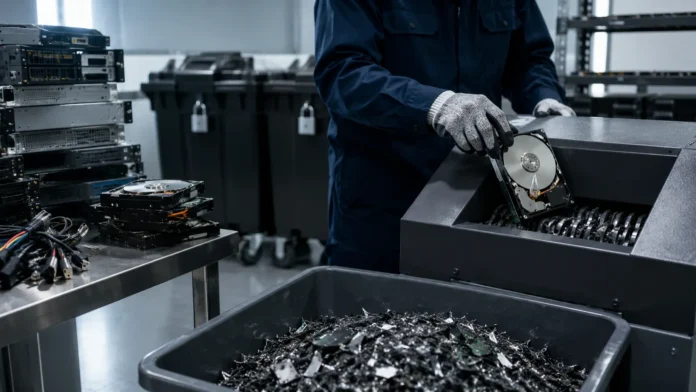
Physical destruction intentionally damages storage media so that recovering usable information becomes impractical or impossible at the required security level. Common approaches include shredding, crushing, disintegrating, grinding, or using specialized equipment designed for particular storage technologies. Physical destruction is often chosen for failed devices that cannot be sanitized logically or for media containing information that an organization does not want to leave in reusable form. The destruction process must match the technology because breaking a device casing does not necessarily destroy every data-bearing component inside. Organizations should also consider environmental handling of the remaining electronic waste. Certified recycling and controlled downstream disposal can prevent secure data practices from creating unnecessary environmental problems.
Data Destruction for Hard Drives, SSDs and Other Media
Traditional magnetic hard disk drives store information differently from modern solid-state storage, which affects the destruction methods organizations should choose. A functioning hard drive intended for reuse may be suitable for an approved logical sanitization process capable of addressing its accessible storage areas. When reuse is not required, degaussing or physical destruction can provide other options depending on policy and data sensitivity. Failed hard drives need additional consideration because software sanitization cannot be trusted when the device cannot reliably receive or execute commands. In those situations, secure physical destruction is often more practical. Asset records should still identify the drive by serial number or another unique identifier before it leaves organizational custody or enters a destruction process.
Solid-state drives require particular care because they use flash memory and internal controllers that manage storage differently from conventional hard drives. Technologies such as wear leveling, spare blocks, remapping, and overprovisioning can make simplistic overwrite assumptions unreliable. Organizations should use sanitization methods specifically appropriate for the SSD and its supported security capabilities rather than applying an old hard-drive procedure automatically. Device-supported secure erase, cryptographic erasure under properly implemented encryption, or suitable physical destruction may be considered depending on the situation. When physically destroying SSDs, the process needs to damage the actual flash memory components rather than merely breaking the outer enclosure. Media-aware procedures are essential because storage technology changes faster than generic destruction policies sometimes do.
Smartphones and tablets contain increasingly large amounts of sensitive business and personal information, including messages, documents, photographs, authentication tokens, application data, contact details, and synchronized cloud content. Modern mobile devices commonly use hardware-backed encryption, making manufacturer-supported reset and key destruction important parts of the sanitization process when configured correctly. Organizations should remove device-management relationships, enterprise accounts, SIM or removable cards, activation locks, and other ownership controls before legitimate reuse or resale. A reset should be performed through an approved procedure rather than relying on manual deletion of visible applications and files. Corporate mobile-device management can make this process more consistent by allowing administrators to enforce encryption and remotely wipe devices when they remain manageable.
Removable media creates another significant challenge because USB flash drives, memory cards, and portable storage devices can move easily between employees and locations. Their small size makes them convenient for business use but also easier to lose, forget, or bypass during formal asset-disposal processes. Organizations should control which removable media types are permitted and maintain additional tracking for devices containing sensitive information. Sanitization methods must match the underlying flash or magnetic technology rather than relying on the physical size of the device. When small flash media contains highly sensitive information and reliable logical sanitization cannot be confirmed, physical destruction may be the preferred option. Secure containers can help prevent media from disappearing while waiting for destruction.
Backup tapes, optical discs, embedded storage, network appliances, printers, and specialized devices are frequently overlooked during data destruction projects. Modern office equipment can contain internal drives storing scanned documents, print jobs, configuration information, credentials, and address books. Routers, firewalls, servers, storage arrays, and other infrastructure may also retain configuration data or security secrets after being removed from service. Optical discs cannot always be treated using methods designed for magnetic or flash storage, while backup tapes may require specialized sanitization or physical destruction. Before disposing of equipment, organizations should determine whether it contains persistent storage even when data storage was not the device’s primary business function. Asset retirement should focus on information-bearing components rather than obvious computers alone.
Benefits of a Strong Data Destruction Program
The most immediate benefit of secure data destruction is reducing the risk that sensitive information remains accessible after an organization no longer controls the original device or service. Retired equipment may be sold, recycled, returned to a leasing company, donated, transferred internally, or handled by third-party vendors. Without sanitization, each transition introduces another opportunity for unauthorized access. A formal destruction process closes this exposure by treating disposal as a security-controlled event instead of an informal equipment-management task. Organizations can apply stronger methods to higher-risk information while using reusable sanitization where appropriate for lower-risk devices. This risk-based approach protects confidentiality without unnecessarily destroying valuable hardware that could be safely redeployed.
Effective destruction also supports privacy and regulatory obligations. Businesses increasingly hold personal information about customers, employees, applicants, patients, users, and business partners, creating expectations around how long information should remain accessible. Keeping data indefinitely without a legitimate purpose can increase both privacy risk and breach impact. A defined retention schedule paired with reliable destruction helps organizations remove information once contractual, operational, or legal requirements have been satisfied. This process also demonstrates that privacy is being addressed throughout the data lifecycle rather than only during collection. Data minimization becomes much more meaningful when organizations can actually remove information confidently at the end of its approved retention period.
Another benefit is reduced breach exposure. The more unnecessary information an organization retains, the more potential material an attacker could reach during a future compromise. Removing expired backups, retired device data, old exports, abandoned user accounts, and obsolete copies reduces the organization’s overall information footprint. Data destruction therefore complements access control, encryption, monitoring, and other cybersecurity measures by reducing the quantity of sensitive information requiring protection. It cannot substitute for those controls, but it can limit potential consequences when something goes wrong. Security teams should consider unnecessary retained data a form of risk accumulation rather than harmless digital clutter.
A reliable sanitization program can also preserve financial value by allowing equipment to be reused safely. Organizations replace large numbers of laptops, phones, servers, and storage devices during refresh cycles, and automatically destroying every functioning asset can be expensive and environmentally wasteful. When approved logical sanitization provides sufficient assurance, devices may be redeployed internally, resold through controlled channels, returned to leasing providers, or donated according to policy. Recovering residual value can offset technology-refresh costs while supporting sustainability objectives. The critical condition is that reuse must follow verified sanitization rather than casual factory resets. Security and sustainability can support one another when destruction decisions are based on actual risk instead of one universal method.
Finally, a mature data destruction program improves organizational accountability. Employees know where retired devices should go instead of keeping old laptops in drawers or disposing of storage informally. IT teams can track equipment from decommissioning through sanitization and final disposition, while security teams can review exceptions and verification results. Auditors and customers can receive evidence that disposal is controlled rather than relying on verbal assurances. A consistent process also reduces emergency decisions when large numbers of devices reach end of life simultaneously. Data destruction becomes predictable, measurable, and repeatable, which is exactly how an important security control should operate.
Data Destruction Best Practices for Businesses
Begin with an information classification and retention framework before deciding how media should be destroyed. Organizations need to understand which information is public, internal, confidential, regulated, highly sensitive, or otherwise subject to special handling. Destruction requirements should reflect the potential harm caused by recovery rather than treating every device identically. Retention requirements also matter because securely destroying information too early can create legal, operational, or contractual problems just as retaining it indefinitely creates security risk. Security, legal, privacy, records-management, and business teams may need to collaborate on these decisions. A clear policy establishes when information becomes eligible for disposal and which sanitization outcomes are acceptable for different categories.
Maintain an accurate asset inventory that extends beyond ordinary computers. Storage devices should be tracked using useful identifiers such as serial numbers, asset tags, model information, assigned users, system ownership, and security classification where appropriate. The inventory should include removable drives, servers, backup media, mobile devices, network equipment, multifunction printers, and other technology containing persistent storage. Cloud and virtual assets require separate tracking because no physical drive may be available to the organization. Accurate inventory makes it possible to demonstrate that equipment entering a destruction process actually reached an approved final state. Without inventory control, even a technically excellent destruction method can leave organizations uncertain about missing devices.
Create approved sanitization procedures for each major media type instead of relying on employee judgment at disposal time. The policy should explain when logical clearing is acceptable, when stronger purging is required, and when physical destruction is mandatory. It should also identify approved tools, responsible teams, verification requirements, exception handling, and how failed devices are managed. Procedures need periodic review because storage technologies evolve and new device categories appear. An approach written for spinning hard drives may not adequately address SSDs, encrypted mobile devices, or cloud-hosted storage. Media-specific guidance reduces the chance that an employee chooses an inappropriate method simply because it worked on older equipment.
Maintain a documented chain of custody whenever storage media leaves the immediate control of its normal owner. Devices waiting for destruction should be placed in secure designated locations rather than stacked in open hallways or unlocked storage rooms. Transfers between departments or vendors should be recorded so responsibility remains clear at every stage. Organizations handling especially sensitive information may use tamper-evident containers, sealed transport, witnessed destruction, or other enhanced controls. Third-party service providers should not create a blind spot where assets disappear from internal records until a certificate arrives weeks later. Accountability should continue until the organization has reliable evidence that sanitization and final disposition occurred as required.
Verification should be built into the destruction process rather than treated as optional quality control. Logical sanitization tools can produce logs showing device identifiers, method used, execution results, and verification outcomes. Physical destruction processes should confirm that data-bearing components reached the required physical state instead of relying only on photographs of damaged external cases. Organizations may sample completed media, perform recovery testing where appropriate, or independently review vendor processes according to risk. Failed sanitization attempts should trigger a defined exception workflow rather than being quietly marked complete. A destruction program becomes trustworthy when it can demonstrate results, not simply when employees can describe the procedure they intended to follow.
Building a Secure Data Destruction Process
A good destruction process begins when a system or device is identified for retirement rather than when it reaches a recycling facility. The asset owner or responsible IT team should confirm that the device is no longer required, determine whether necessary records have been retained elsewhere, and ensure legitimate preservation requirements are satisfied. Business data should not be destroyed merely because hardware is being replaced if retention rules require that information to remain available. Once disposal is authorized, the asset can be removed from production access and placed into a controlled sanitization workflow. This separation prevents retired equipment from being casually reused or removed before its security status is known.
The next stage is identifying the media and choosing an appropriate sanitization method. Teams should determine whether the storage is magnetic, flash-based, optical, embedded, encrypted, virtual, or part of another technology requiring specialized treatment. They should also confirm whether the device is functioning well enough to support logical sanitization. A failed SSD, for example, cannot simply be trusted to execute an erase command if communication with the controller is unreliable. Information sensitivity and future use then determine whether the organization prefers secure reuse or physical destruction. The decision should follow established policy rather than being recreated from scratch for every laptop.
Execution should occur using authorized personnel, tools, equipment, and facilities. Logical destruction systems should record which device was processed and whether the operation completed successfully. Physical destruction should occur in an environment that prevents unauthorized removal of media before the destruction stage is complete. When outside vendors perform the work, contractual expectations should cover security controls, personnel access, transport, handling, downstream recyclers, incident notification, and evidence of completion. Organizations should avoid transferring sensitive media to unknown recycling chains merely because a provider offers free equipment collection. Secure disposal begins with understanding who will physically control the data-bearing asset at every step.
After sanitization, verification determines whether the media can safely proceed to reuse, resale, recycling, return, or final disposal. Verification methods vary depending on technology and destruction method, but the goal remains consistent: establish confidence that target data is no longer accessible at the required level. If verification fails, the device should not quietly return to the same processing queue without investigation. It may need a different sanitization method or physical destruction. Recording failed attempts is useful because recurring problems may reveal defective tools, incompatible device models, or incomplete procedures. Quality assurance allows the program to improve rather than repeating the same assumptions indefinitely.
The final stage is documentation and reconciliation. Every processed asset should be matched against the original inventory so missing devices or unexplained serial numbers can be investigated promptly. Records may capture asset identity, media type, sanitization method, date, operator or vendor, verification result, final destination, and destruction certificate when applicable. Retain these records according to organizational policy rather than keeping them indefinitely without purpose. Periodic reporting can show how many devices were sanitized, destroyed, reused, recycled, or processed through exceptions. This information helps leadership understand both security performance and equipment lifecycle outcomes, turning data destruction into a managed program rather than an invisible technical task.
Compliance, Certificates and Chain of Custody
Data destruction frequently supports legal, contractual, privacy, and industry obligations, but organizations should avoid treating compliance as a single universal checklist. Requirements vary according to jurisdiction, industry, customer agreements, information type, and the systems involved. A healthcare organization, financial institution, government contractor, technology provider, and small local business may face very different retention and disposal expectations. Legal or compliance teams should identify which obligations apply before security teams design procedures. The technical method should then provide evidence appropriate to those obligations. Secure destruction is strongest when policy connects business requirements with actual storage technologies rather than copying a generic compliance statement from another organization.
A certificate of destruction or sanitization can provide useful evidence that specific media entered an approved process. A good record should clearly identify the assets involved rather than saying only that a truckload of equipment was destroyed. Serial numbers, asset identifiers, dates, methods, responsible entities, and verification information can make certificates more meaningful. However, a certificate should not replace due diligence. Organizations still need confidence that the vendor’s processes, equipment, people, facilities, and downstream handling genuinely support the claims being documented. Paperwork is valuable when it reflects a trustworthy process, not when it becomes the only reason anyone believes destruction occurred.
Chain of custody records are particularly important when devices containing sensitive information are transported outside company facilities. The organization should know when assets were released, who received them, how they were secured during transport, where they were processed, and what happened after destruction. Unexplained gaps undermine confidence even if the final vendor provides a certificate. High-risk environments may require sealed containers, locked vehicles, documented handoffs, controlled storage, surveillance, or witnessed destruction. The appropriate level depends on risk rather than theatrics. The objective is to prevent devices from disappearing or being accessed while they remain recoverable, which is precisely when the information is most vulnerable during disposal.
Vendor assessment should cover more than advertised destruction equipment. Ask how employees are screened and trained, how facilities are secured, how assets are inventoried, what happens when sanitization fails, how subcontractors are controlled, and where destroyed materials eventually go. Organizations should understand whether the provider performs services itself or sends media through additional downstream partners. Environmental practices also matter because electronics containing batteries, metals, and other components require responsible recycling. Contract terms should define responsibilities if assets are lost or a breach occurs. A vendor becomes part of the organization’s information security process whenever it receives unsanitized media, so procurement should reflect that level of trust.
Regular audits help determine whether documented procedures still match actual practice. Security teams may review destruction logs, compare certificates with asset records, inspect storage areas, observe vendor processes, or test samples from logically sanitized devices. Audit findings should result in improvements instead of existing only to satisfy a checklist. An increase in unexplained inventory differences, failed erasures, delayed certificates, or untracked removable media can signal control weaknesses before a serious incident occurs. Data destruction is not a process that should be designed once and ignored indefinitely. Storage technologies, vendors, business systems, regulations, and organizational risk continually change, making periodic reassessment essential.
Data Destruction in Cloud and Hybrid Environments
Cloud computing changes the physical side of data destruction because customers may not own or directly handle the storage devices containing their information. Data can be distributed across virtual machines, object storage, databases, snapshots, caches, replicas, backups, and managed services. Deleting one visible cloud resource does not necessarily describe what happens to every underlying copy immediately. Organizations therefore need to understand their provider’s data lifecycle, deletion behavior, backup retention, encryption, and media sanitization practices. Contracts and service documentation become important parts of the destruction strategy. Cloud data disposal is still data destruction even when nobody inside the customer organization touches a physical hard drive.
Encryption can provide an important control in cloud environments because properly managed keys can separate access to information from physical control of the storage hardware. Some architectures allow organizations to manage their own encryption keys or separate key access from the cloud storage provider. When keys are securely destroyed under an appropriate cryptographic-erasure design, encrypted information may become inaccessible without requiring direct physical destruction of every underlying storage location. However, organizations need to understand key copies, backups, replicated keys, recovery services, and external key management before relying on this approach. Encryption simplifies certain destruction problems only when key governance has been designed carefully from the beginning.
SaaS applications create another challenge because employees may store company information across collaboration platforms, CRM systems, project-management tools, file-sharing services, marketing platforms, and countless specialized applications. Closing a user account does not necessarily delete all associated organizational data. Administrators should understand retention settings, deleted-item periods, backups, legal holds, exports, integrations, and account-termination procedures for important services. Offboarding employees should include transferring legitimate business records while removing unnecessary personal workspace copies. Shadow IT makes this harder because unapproved applications may never appear in formal inventories. Data destruction programs should therefore connect with SaaS discovery and access governance rather than concentrating only on physical devices.
Remote work has expanded the number of locations where corporate information can remain after an employee changes roles or leaves the organization. Data may be stored on company laptops, mobile phones, external drives, home printers, downloaded files, browser caches, or synchronized personal devices when controls are weak. Strong endpoint management can reduce these risks by enforcing encryption, limiting local storage, and supporting remote wipe capabilities. However, organizations should not rely solely on remote commands if a device is offline, damaged, or no longer under management. Asset-return procedures and employee offboarding should confirm both physical custody and information-removal requirements. Remote work makes disciplined lifecycle management more important, not less.
Hybrid environments require organizations to think in terms of data rather than hardware. A single business document may exist simultaneously on an employee laptop, cloud collaboration platform, server backup, mobile application, email attachment, and disaster-recovery copy. Destroying one instance therefore cannot automatically satisfy a complete deletion requirement. Data inventories, retention policies, system ownership, and application architecture help identify where meaningful copies may remain. In some systems, immediate deletion of every backup copy may be technically impractical, requiring controlled expiration and restricted restoration procedures instead. The goal is to design predictable lifecycle behavior so obsolete information eventually disappears across the environment rather than remaining indefinitely because nobody owns the final deletion process.
Common Data Destruction Mistakes to Avoid
One of the most common mistakes is assuming that deleting files, emptying the recycle bin, or performing a quick format equals secure destruction. These actions may remove ordinary user access while leaving recoverable information on the underlying storage. The exact recovery potential depends on the technology and what happens afterward, but organizations should not build security policy around uncertainty. Approved sanitization procedures provide a much stronger basis for disposal decisions. Employees should never be expected to determine whether manual deletion is sufficient for sensitive business data. Centralizing the process through trained IT or security personnel reduces inconsistent handling across departments.
Applying the same destruction method to every device is another major mistake. Hard drives, SSDs, mobile devices, magnetic tapes, optical discs, embedded storage, and cloud services do not behave identically. A method developed for traditional hard disks may provide poor assurance for modern flash storage, while degaussing provides no meaningful solution for nonmagnetic memory. Organizations should classify media before selecting a technique. This requirement becomes increasingly important as new storage formats and hardware architectures enter the business. A media-agnostic policy may sound simple but can produce exactly the kind of false confidence that secure destruction is supposed to prevent.
Poor inventory management can undermine an otherwise strong destruction program. An organization might use excellent shredding equipment yet still suffer a breach because two forgotten drives were never delivered to the destruction area. Retired devices should remain tracked until they reach a verified final state. Employees should not keep unused laptops, drives, phones, or backup media indefinitely in desks and cabinets simply because nobody created a convenient return process. Regular asset reconciliation helps identify equipment that has stopped reporting to management systems without appearing in disposal records. Security teams need to know not only how media was destroyed but whether every relevant device actually entered the process.
Trusting vendors without verification is another avoidable problem. A low-cost electronics recycler may advertise secure destruction while outsourcing processing to unknown partners or using methods that do not match the organization’s requirements. Contracts, facility reviews, documented chain of custody, certificates, audits, and clear incident responsibilities can provide stronger assurance. Organizations should also confirm what happens to devices rejected by automated sanitization tools. Failed media should move into a controlled exception process rather than being shipped onward as ordinary recyclable electronics. Selecting a vendor should be treated as a security decision when the provider will receive recoverable confidential information.
Finally, businesses often focus so heavily on destruction that they forget the retention side of the lifecycle. Removing information prematurely can violate legal holds, contractual commitments, tax requirements, investigation needs, or legitimate business obligations. Keeping everything forever is risky, but destroying everything as quickly as possible can also create serious problems. A mature program connects retention schedules with approved destruction so information is available for as long as it should be and reliably removed afterward. Legal, privacy, cybersecurity, IT, and records-management teams should share responsibility for defining these rules. Data destruction works best as the final stage of deliberate information governance rather than an isolated security activity.
Conclusion
Data destruction is an essential part of modern information security because sensitive data does not stop creating risk when a device reaches the end of its useful life. Old laptops, servers, drives, phones, backup tapes, cloud resources, and removable media may still contain information valuable to attackers or unauthorized recipients. Ordinary deletion should not automatically be treated as secure removal. Organizations need sanitization methods matched to the storage technology, information sensitivity, and intended future use of the device. Secure overwriting, approved device erase functions, cryptographic erasure, degaussing, and physical destruction each have appropriate situations. The objective is not to use the most dramatic method but to select one that provides the required assurance.
Media type is one of the most important factors in that decision. Traditional magnetic hard drives, solid-state drives, mobile devices, backup tapes, optical media, and embedded storage operate differently enough that one universal destruction procedure is rarely appropriate. Modern flash storage has made old assumptions about repeated overwriting particularly problematic when organizations apply them without understanding internal device behavior. Encryption and cryptographic erasure can provide powerful alternatives when key management is designed correctly. Failed equipment may require physical destruction because logical commands cannot be verified reliably. Staying aware of storage technology is therefore a continuing responsibility for security and IT teams.
The strongest programs also go beyond technical methods. Accurate inventory, documented chain of custody, approved procedures, verified results, secure temporary storage, responsible vendors, and useful certificates all contribute to trustworthy destruction. Organizations should know which device entered the process, what happened to it, whether the procedure succeeded, and where the asset ultimately went. Exceptions deserve special attention because failed drives and unrecognized media can easily escape normal workflows. Periodic audits help uncover these gaps before they produce incidents. Evidence turns data destruction from an informal promise into a defensible security control.
Cloud computing and remote work have made destruction more complex because sensitive information increasingly exists beyond hardware directly owned by the organization. SaaS platforms, cloud backups, virtual disks, snapshots, personal workspaces, mobile devices, and synchronized copies may all contain versions of the same record. Effective destruction therefore requires information lifecycle management across systems, not merely a room containing a disk shredder. Retention settings, encryption, key management, employee offboarding, cloud contracts, and backup expiration should all support the same disposal objectives. Organizations that understand where data exists are far better positioned to remove it responsibly when the time comes.
Ultimately, data destruction should be planned from the moment information is created rather than considered only when equipment is discarded. Classify sensitive information, establish realistic retention periods, control where copies can spread, encrypt data where appropriate, track storage assets, and define approved sanitization outcomes in advance. When information reaches the end of its required life, the organization can then destroy it using a repeatable and verifiable process. This approach reduces breach exposure, supports privacy, improves compliance readiness, enables safer equipment reuse, and creates greater confidence throughout the technology lifecycle. Secure destruction is not simply about getting rid of old data; it is about ensuring information stops being a liability when the business no longer needs it.
Frequently Asked Questions About Data Destruction
What is data destruction?
Data destruction is the process of making information stored on digital or physical media inaccessible when it is no longer required. Depending on the media and security level, this can involve secure erasure, cryptographic erasure, degaussing, or physical destruction.
Is deleting files the same as destroying data?
No. Normal file deletion may remove a file from ordinary view without ensuring that the underlying information cannot be recovered. Secure data destruction uses controlled sanitization methods designed for the specific storage technology and risk level.
What is the best data destruction method for an SSD?
The best method depends on the SSD, its encryption configuration, security requirements, and whether the device will be reused. Appropriate options may include supported secure erase functions, properly implemented cryptographic erasure, or physical destruction when reuse is unnecessary or reliable logical sanitization cannot be confirmed.
Can physically destroying a hard drive guarantee data is gone?
Proper physical destruction can make recovery impractical when the actual data-bearing components are destroyed to the required level. Simply damaging the outer casing or drilling one random hole should not automatically be treated as a controlled enterprise destruction process.
How often should businesses review their data destruction policy?
Businesses should review the policy regularly and whenever storage technology, systems, vendors, regulations, or risk requirements change significantly. Periodic reviews help ensure procedures designed for older devices still provide appropriate protection for modern SSDs, mobile devices, cloud storage, and other environments.




