
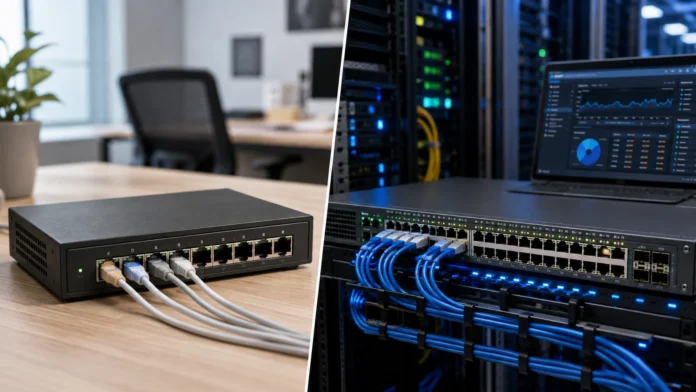

Managed vs Unmanaged Switch: Which Should You Choose?
Choosing between a managed vs unmanaged switch depends on how much control, visibility, security, and network flexibility you actually need. Both types of Ethernet switches connect computers, servers, printers, access points, cameras, and other devices within a local network, but they provide very different levels of administration. An unmanaged switch is designed primarily for simple plug-and-play connectivity, while a managed switch gives administrators tools for configuring traffic, creating VLANs, monitoring performance, prioritizing applications, and controlling network behavior. Neither option is automatically better for everyone because the right choice depends on the size and complexity of the network.
A basic home network may work perfectly with an unmanaged switch because users simply need additional Ethernet ports without complex configuration. A growing company, school, hotel, office, data center, or surveillance network may benefit much more from managed switching because administrators need segmentation, security, troubleshooting, and remote control. There are also smart or lightly managed switches that sit between the two categories and offer selected advanced features at a lower cost. Understanding these differences helps prevent businesses from buying networking equipment that is either unnecessarily complicated or too limited for future needs. This guide compares managed and unmanaged switches in detail and explains which one makes sense for different environments.
What Is an Unmanaged Switch?
An unmanaged switch is a network switch designed to work with little or no configuration. You connect Ethernet cables to the available ports, power on the device, and the switch begins forwarding traffic between connected equipment automatically. It learns the MAC addresses associated with each port and uses that information to send Ethernet frames toward the correct destination. Users generally do not need to log into an administration interface or install management software. This simplicity makes unmanaged switches popular for homes, small offices, temporary networks, entertainment systems, and other environments where advanced network control is unnecessary.
The main advantage of an unmanaged switch is convenience. Suppose your home router has only four LAN ports, but you need wired connections for a desktop computer, television, game console, network printer, and media server. Connecting an unmanaged switch to one router port can immediately provide several additional Ethernet connections. There is usually nothing else to configure because the router continues handling functions such as IP address assignment, internet routing, and firewall protection. The switch simply expands the local wired network and forwards traffic where it needs to go.
Unmanaged switches can support modern Ethernet speeds, including Gigabit Ethernet and multi-gigabit networking depending on the model. Choosing unmanaged does not automatically mean accepting slow performance. A quality unmanaged Gigabit switch can transfer data very effectively between compatible devices on a home or small-business LAN. Some models also support Power over Ethernet, allowing them to provide both data and electrical power to devices such as IP cameras or wireless access points. However, the ability to supply PoE does not necessarily mean the switch provides advanced configuration or traffic management.
The limitation is that users generally cannot control how the switch behaves beyond its basic built-in functionality. You usually cannot create separate VLANs, monitor individual port statistics through a management dashboard, configure detailed access policies, or remotely disable problematic ports. If network performance becomes poor, troubleshooting options are limited because the device offers little visibility into traffic. This may not matter at all in a small environment. It becomes more important when many users, services, departments, or critical devices depend on the network.
Unmanaged switches are therefore best viewed as simple Ethernet expansion devices. They solve the straightforward problem of connecting more wired devices without introducing administrative overhead. Their low purchase price, quiet operation, compact size, and simple setup make them attractive when network requirements are basic. Problems appear only when a network later needs segmentation, monitoring, redundancy, or stronger control. Before buying one, users should consider whether their environment is likely to remain simple for the expected lifetime of the switch.
What Is a Managed Switch?
A managed switch is an Ethernet switch that allows administrators to configure, monitor, and control how network traffic moves between connected devices. It performs the same basic switching function as an unmanaged model but adds a management layer that exposes settings through a web interface, command-line interface, centralized controller, application, or other administrative system. Managed switches are common in business networks because organizations need more control than plug-and-play connectivity can provide. They can support features such as VLANs, traffic prioritization, port security, link aggregation, network monitoring, redundancy protocols, and detailed event logging.
One of the most important benefits is visibility. Administrators can usually see whether individual ports are active, which speed they negotiated, how much traffic is passing through them, and whether errors or dropped packets are occurring. This information becomes extremely useful during troubleshooting. If one employee complains about a slow network connection, an administrator can inspect the relevant port instead of physically testing every cable immediately. Central monitoring can also reveal unusual bandwidth usage or failing links before users notice a major problem.
Managed switches allow networks to be segmented using VLANs, short for Virtual Local Area Networks. A company might place employee computers on one VLAN, security cameras on another, guest Wi-Fi on a third, and servers on a separate network. These devices can still share the same physical switching infrastructure while remaining logically separated. Routers or firewalls then control which groups are allowed to communicate. Segmentation improves organization, security, performance management, and troubleshooting. It is one of the strongest reasons businesses choose managed switches over unmanaged alternatives.
Traffic management is another important capability. Managed switches can often implement Quality of Service, commonly called QoS, to prioritize certain traffic when network capacity becomes limited. Voice calls, video conferencing, or critical business applications can receive higher priority than large background downloads. Managed devices can also combine several physical network links using link aggregation, increasing available bandwidth or providing redundancy between compatible devices. These capabilities become valuable as network traffic grows and multiple applications compete for capacity.
Managed switches require more knowledge and administration than unmanaged models. Incorrect VLAN configuration, access policies, or spanning-tree settings can cause connectivity problems that would never appear on a simple plug-and-play switch. Organizations therefore need people who understand the features they enable. The additional cost and complexity are worthwhile when the network requires professional control and reliability. For a network containing only a handful of ordinary home devices, many management features may remain unused. The decision should reflect actual requirements rather than assuming more features are always necessary.
Managed vs Unmanaged Switch: Key Differences
Configuration is the most obvious difference between managed and unmanaged switches. An unmanaged switch operates according to predefined settings and usually provides little user-adjustable control. A managed switch allows administrators to configure individual ports, VLANs, traffic policies, monitoring, security, and many other behaviors. This flexibility means managed switching can adapt to changing business requirements. It also means administrators need to maintain configurations carefully. For simple networks where every device can communicate freely, the absence of configuration may actually be an advantage because there is less opportunity for human error.
Network visibility creates another major difference. Managed switches generally provide port statistics, error counters, bandwidth information, logs, and health information that network administrators can review. Enterprise models can integrate with monitoring platforms so problems generate alerts automatically. Unmanaged switches provide much less information, often limited to physical LEDs indicating link and activity status. For a home user, these indicators may be sufficient. In a business supporting dozens or hundreds of employees, the ability to diagnose a port remotely can dramatically reduce troubleshooting time.
Security capabilities are stronger on managed switches. Administrators can isolate traffic using VLANs, restrict devices on particular ports, disable unused connections, apply access controls, and monitor suspicious activity depending on the model. Some enterprise switches support advanced authentication features that allow only approved users or devices onto the network. An unmanaged switch normally forwards local traffic without providing these granular controls. Security still depends heavily on firewalls, endpoints, identity systems, and other protections, but managed switches provide another important layer of network control.
Scalability also differs considerably. An unmanaged switch can work perfectly when connecting five or ten devices, but managing dozens of interconnected unmanaged switches becomes difficult because administrators have little central visibility. Managed switches can support larger network designs involving trunks, VLANs, redundant links, centralized configuration, and hierarchical architectures. Organizations can build networks across multiple floors, offices, or buildings while maintaining consistent policies. Growth does not always require an enterprise switch immediately, but scalable management becomes increasingly useful as the number of devices rises.
Price favors unmanaged switches because simpler hardware and software generally cost less. Managed models can cost more because they include stronger processors, more memory, administrative software, advanced protocols, and vendor support. The actual price difference varies considerably according to port count, Ethernet speed, PoE capacity, switching bandwidth, and feature level. A cheap switch is not necessarily economical if it forces the organization to replace equipment once requirements grow. Buyers should compare total lifecycle value rather than purchase price alone.
VLANs, QoS and Other Managed Switch Features
VLAN support is one of the defining features of managed switches. A VLAN allows administrators to divide one physical switching environment into several logical networks. Devices in different VLANs do not automatically share the same broadcast domain, even when they connect to the same switch. For example, an office can separate finance computers, guest devices, security cameras, and VoIP phones into different network segments. This provides greater control over which systems can reach one another. A router or firewall can then enforce security policies between those segments.
Quality of Service helps administrators manage competing traffic. Imagine an office where employees are using video calls while another computer transfers a massive backup across the network. Without appropriate traffic management, congestion could affect real-time audio or video quality. QoS can identify and prioritize selected traffic classes so latency-sensitive applications receive timely treatment. The exact configuration varies by switch and network architecture. QoS cannot create bandwidth that does not exist, but it can help allocate available capacity more intelligently when congestion occurs.
Link aggregation allows several physical Ethernet links to function together between compatible devices. A server, storage system, or another switch might connect through multiple ports instead of relying on one cable. Depending on the configuration, this can increase total available bandwidth across multiple traffic flows and provide resilience if one link fails. Both ends need compatible settings for the aggregation to function correctly. This feature is useful in business and data-center environments where one physical connection could become a bottleneck or single point of failure.
Spanning Tree Protocol and related technologies help prevent switching loops when redundant network connections exist. Ethernet loops can create severe problems because frames may circulate continuously, producing broadcast storms capable of overwhelming a network. Managed switches can detect redundant paths and logically block selected links until they are needed. If an active path fails, another path can become available depending on the design. Redundancy is essential in many professional networks, but implementing it correctly requires understanding the protocols involved. Small unmanaged environments typically avoid complex redundant topologies altogether.
Additional managed features can include port mirroring, SNMP monitoring, remote management, jumbo frame configuration, storm control, multicast management, MAC filtering, port isolation, and advanced security controls. Not every business needs every feature, and switch capabilities vary significantly between product families. Buyers should identify which capabilities solve real operational problems before paying for enterprise functionality. The value of managed switching comes from using control intelligently. A sophisticated switch configured exactly like an unmanaged one may provide little immediate benefit beyond future flexibility.
Managed vs Unmanaged Switch for Home Networks
Most ordinary home networks do not require a fully managed switch. A typical household may simply need more wired ports for computers, game consoles, televisions, streaming devices, network storage, or smart-home hubs. An unmanaged Gigabit switch can provide these additional connections with almost no setup. Connect one port to the router, connect the devices, and normal network communication begins. For users who do not want to learn networking concepts such as VLANs or trunk ports, this simplicity can be ideal. There is also less risk of accidentally breaking connectivity through incorrect configuration.
Home users with network-attached storage can still achieve strong performance using unmanaged switches. If the NAS and computers all support Gigabit Ethernet, large files can move across the LAN without requiring management features. Multi-gigabit unmanaged switches can provide even more bandwidth for users with capable storage and computers. The important consideration is matching switch speed with connected equipment. Management functionality does not itself make file transfers faster. Port speed, storage performance, cabling, and device capabilities determine maximum throughput.
More advanced home networks can benefit from managed switches, particularly when users want to separate IoT devices, security cameras, work computers, guest networks, and personal systems. VLANs allow these categories to remain logically isolated even when they share physical cables and switches. A firewall or VLAN-capable router is also needed to control communication between the segments. Home labs frequently use managed switches because enthusiasts experiment with servers, virtualization, cybersecurity, and network architecture. In such environments, management features provide genuine learning and operational value.
Power over Ethernet can influence the decision as well. Home users installing several ceiling-mounted Wi-Fi access points or PoE security cameras may want a switch capable of powering those devices. Both managed and unmanaged PoE switches exist, so PoE alone does not require management. However, a managed PoE switch may allow users to monitor power consumption or remotely restart a connected camera or access point by cycling power on that port. This can be useful when devices are mounted in difficult-to-reach locations.
For most households, an unmanaged switch remains the easiest and most economical choice. A managed or smart switch becomes worthwhile when the user has specific goals such as VLAN segmentation, network monitoring, advanced Wi-Fi infrastructure, multiple servers, or a home lab. Buying advanced equipment simply because it sounds more professional can add unnecessary complexity. Home networking works best when the architecture remains as simple as possible while still meeting security, performance, and reliability needs.
Managed vs Unmanaged Switch for Businesses
Businesses generally benefit more from managed switches because professional networks contain more users, applications, security requirements, and critical services. Even a relatively small office can have employee computers, VoIP phones, wireless access points, printers, cameras, servers, and guest devices sharing the same infrastructure. Keeping all of these devices on one uncontrolled network can make troubleshooting and security harder. Managed switches allow administrators to separate traffic logically and apply policies appropriate to each device category. This creates a cleaner foundation for growth.
VLANs are particularly valuable in business environments. Guest Wi-Fi users should not normally have direct access to internal employee computers or servers. Security cameras may need to communicate with recording systems while being isolated from ordinary workstations. Voice phones can be placed in their own VLAN so traffic policies and addressing remain easier to manage. Managed switches make these designs practical without requiring a completely separate physical switch for every group. Logical segmentation improves both efficiency and network security.
Remote management reduces support effort when businesses have several offices or large facilities. An administrator can inspect port status, change configuration, or disable a connection without traveling to the wiring closet physically. Centralized management platforms can control many switches from one interface, making configuration more consistent. This becomes increasingly valuable as organizations expand across multiple floors, buildings, or branches. An unmanaged switch installed at each location might work initially but provide little useful information when a remote connectivity problem occurs.
Business continuity also favors managed infrastructure because redundancy features can reduce single points of failure. Organizations can connect critical switches through multiple links and use appropriate protocols to prevent loops while maintaining backup paths. Network teams can monitor link errors, device temperatures, power use, and other health indicators depending on hardware capabilities. This proactive visibility allows failing components to be replaced before they create serious outages. Unmanaged switches can still be reliable hardware, but they cannot usually provide the same operational intelligence.
Very small businesses with only a few computers may still use unmanaged switches successfully, particularly when their router or firewall handles most networking requirements. The decision should depend on complexity rather than the fact that the network belongs to a business. If all employees use one trusted LAN and there are no special segmentation or monitoring needs, an unmanaged model can be adequate. Businesses expecting growth should consider whether spending slightly more on a managed or smart switch now can prevent a complete replacement later.
Security Differences Between Managed and Unmanaged Switches
Network segmentation gives managed switches an important security advantage. VLANs allow administrators to reduce how many devices share the same local network environment. If an IoT device becomes compromised, isolation can limit which internal systems it can reach when appropriate firewall policies are in place. A guest network can remain separate from employee computers, and highly sensitive systems can operate within dedicated segments. Segmentation does not automatically provide complete protection, but it reduces unnecessary connectivity. This supports the broader security principle of limiting access according to actual need.
Port security can restrict which devices are allowed to connect through specific physical ports. Depending on the switch, administrators may limit the number of MAC addresses learned on a port or configure other access controls. Unused ports can also be administratively disabled so someone cannot simply plug an unauthorized computer into an empty connection. More advanced enterprise networks can use authentication technologies that verify users or devices before granting network access. These features make managed switches useful components within a layered security architecture.
Managed switches can also provide logging and monitoring that help identify suspicious behavior. Administrators may notice unusual traffic volumes, repeated errors, or unexpected devices connected to particular ports. Monitoring systems can collect information across many switches and generate alerts according to predefined conditions. Without this visibility, some problems may remain unnoticed until users report performance issues or a larger security incident develops. Observability does not stop attacks by itself, but it gives security and network teams useful evidence for detection and investigation.
An unmanaged switch usually trusts connected devices and forwards traffic according to normal Ethernet behavior without offering detailed policy controls. This does not mean connecting one automatically makes a network unsafe. A home router firewall and secure endpoint devices can still provide strong protection in a simple environment. The limitation is that the switch cannot contribute much additional enforcement or visibility. If security requirements grow, the network must rely more heavily on other equipment or replace the unmanaged switching layer.
Security also depends on managing the managed switch itself correctly. Administrative interfaces should use strong authentication, secure protocols, updated firmware, and restricted access. A switch configured with default credentials or exposed unnecessarily can become a security problem rather than an improvement. Organizations should back up configurations and keep network equipment supported with appropriate updates. Advanced features provide additional protection only when administrators maintain them responsibly. Complexity without good operational practices can introduce new vulnerabilities.
Performance, PoE and Reliability Considerations
Managed and unmanaged switches with equivalent hardware can provide similar basic Ethernet forwarding performance. A managed switch is not inherently faster simply because it has an administration interface. Switching capacity, port speed, forwarding rate, internal architecture, and uplink bandwidth determine raw performance more directly. A good unmanaged Gigabit switch can forward traffic at full line rate in a simple network. Managed features become valuable when administrators need to control or observe that traffic rather than because management magically increases Ethernet speed.
PoE is another feature buyers should evaluate separately from management level. Power over Ethernet allows the switch to provide electrical power through Ethernet cables to compatible devices such as wireless access points, IP phones, security cameras, and access-control equipment. Unmanaged PoE switches can be excellent for small surveillance installations where cameras simply need connectivity and power. Managed PoE models add capabilities such as power monitoring, per-port control, scheduling, and remote restarts. These administrative features become helpful when many powered devices are distributed across a large facility.
PoE budget matters because a switch cannot necessarily provide the maximum supported wattage on every port simultaneously. Buyers should calculate how much power all connected equipment might require and compare that with the switch’s total PoE budget. Wireless access points and advanced cameras can demand more power than simple IP phones. Leaving extra capacity provides flexibility for future additions. Port count alone therefore does not determine whether one PoE switch can support an installation. Total available power is equally important.
Reliability depends on hardware quality, cooling, power supplies, firmware, network design, and operating environment. Enterprise managed switches may include redundant power supplies, hot-swappable components, advanced monitoring, and longer support contracts. These features can justify higher prices where downtime has significant business consequences. Small unmanaged desktop switches can also run reliably for years but usually provide fewer redundancy options. The appropriate reliability level should reflect the impact of failure. A switch connecting one television has very different availability requirements from one supporting an entire office floor.
Fanless switches are attractive in homes and quiet offices because they operate silently, while high-power PoE or high-speed enterprise switches may require active cooling. Rack-mounted models can produce noticeable fan noise and should generally live in network closets rather than workspaces. Power consumption also increases with port count, Ethernet speed, and PoE output. Buyers should consider the physical installation environment alongside networking features. A technically suitable switch can still be a poor choice if it is too noisy, hot, or power-hungry for the intended location.
Smart Switches: The Middle Ground
Smart switches, sometimes called web-managed, lightly managed, or easy-managed switches, provide a middle ground between fully unmanaged and enterprise managed models. They typically offer a web interface and important features such as VLANs, QoS, link aggregation, and basic monitoring without exposing every advanced enterprise protocol. This can make them attractive for small businesses, advanced home networks, and organizations that need segmentation but do not have dedicated network engineers. The exact feature set varies considerably by manufacturer, so buyers should examine specifications carefully rather than relying only on the word smart.
A smart switch can be ideal when VLAN support is the main requirement. A small office may need separate employee, guest, and camera networks but have no need for complex routing protocols or highly advanced command-line management. The administrator can configure a few VLANs through a graphical interface and leave most other settings at their defaults. This provides meaningful network control without the learning curve associated with enterprise equipment. Smart switches are therefore often a practical first step for growing organizations.
Monitoring capabilities are usually more limited than those of fully managed enterprise switches, but they can still provide useful port statistics and status information. Administrators may see which ports are connected, negotiated speeds, VLAN membership, and traffic counters. Some models support SNMP or centralized cloud management, while others offer only a local web interface. Organizations should determine whether remote troubleshooting and fleet-wide visibility will become important. A switch that works well for one site may become inconvenient when the business expands to twenty locations.
Smart PoE switches can provide particularly strong value for small surveillance and wireless networks. Administrators can create separate VLANs for cameras and access points while also controlling their power remotely. If an access point stops responding, the relevant PoE port can sometimes be restarted without physically visiting the device. This reduces operational inconvenience without requiring a full enterprise network platform. The combination of moderate cost and practical management features makes smart PoE switching popular in many small deployments.
The main limitation is that smart switches may not support advanced features needed later. Organizations planning rapid growth should compare future requirements carefully. Upgrading from smart to fully managed infrastructure can require new hardware and configuration changes. However, buying enterprise equipment years before its capabilities are needed can also waste money and increase complexity. Smart switches are most useful when the organization understands its likely scale and chooses a feature set that comfortably covers the foreseeable future.
How to Choose Between a Managed and Unmanaged Switch
Start by counting the devices you need to connect and considering how that number may grow. A home user with six wired devices may only need an eight-port unmanaged switch, while a business supporting employees, phones, access points, cameras, and servers may need considerably more ports. Leaving some unused capacity makes expansion easier. Businesses should also consider uplink requirements because several access switches may connect toward a faster central switch. Port count solves only the physical connection requirement; management needs determine which switch category should provide those ports.
Next, ask whether different device groups need to be isolated. If employees, guests, cameras, servers, and IoT devices should operate on separate VLANs, choose a managed or smart switch that supports the required tagging and trunking features. If every device can safely remain on one straightforward LAN, an unmanaged switch may be sufficient. Segmentation is often the point where networks outgrow plug-and-play switching. Businesses should also confirm that their router or firewall can handle traffic between VLANs because the switch alone may not provide all routing and security functions required.
Consider how important remote troubleshooting is. If the switch will sit beside your desk, physically checking a cable may be easy. If it will be installed in another office, ceiling space, warehouse, or remote branch, management capabilities become far more valuable. Port statistics can show whether a device is connected without requiring a site visit. Managed PoE can even restart certain devices remotely. The cost of one technician trip can sometimes exceed the price difference between unmanaged and managed hardware.
Budget remains important, but switch cost should be evaluated across the expected life of the network. An unmanaged switch may save money initially but become expensive if it must be replaced within a year because VLANs or monitoring are suddenly required. Conversely, a home user may spend hundreds of extra dollars on enterprise features that remain untouched forever. Buyers should identify concrete requirements rather than purchasing according to labels. The most economical switch is the least complex model that reliably supports current needs with reasonable future capacity.
For most basic home networks, choose an unmanaged switch. For advanced homes, small offices needing VLANs, or simple professional deployments, a smart managed switch can provide an excellent compromise. For businesses with multiple departments, security segmentation, VoIP, centralized monitoring, redundancy, or several network closets, fully managed switching is usually the stronger long-term option. The decision becomes straightforward once you evaluate control, security, scale, support requirements, and administrator expertise rather than focusing only on the number of Ethernet ports.
Conclusion
Managed and unmanaged switches perform the same fundamental networking job: they connect Ethernet devices and forward traffic toward the appropriate destination. The key difference is how much control administrators have over that process. An unmanaged switch is designed for simple plug-and-play connectivity with almost no configuration. A managed switch adds VLANs, monitoring, traffic management, security controls, redundancy, and remote administration. Smart switches provide a middle option by offering selected management features without the full complexity of enterprise networking equipment.
Unmanaged switches are excellent when simplicity matters most. Homes, entertainment systems, small workgroups, and temporary networks can gain additional Ethernet ports without requiring any networking expertise. Modern unmanaged switches can provide Gigabit or multi-gigabit speeds and may even support PoE. Their main limitation is lack of visibility and control. If network problems occur, users have fewer diagnostic tools, and the switch cannot easily separate device groups or enforce advanced policies.
Managed switches become more valuable as networks grow. Businesses can create VLANs for employees, guests, phones, cameras, servers, and other systems while using monitoring tools to understand performance. Administrators can configure QoS, aggregate links, build redundant paths, disable unused ports, and troubleshoot devices remotely. These features improve flexibility and operational control but require more knowledge. Incorrect configurations can cause connectivity problems, so organizations should ensure someone understands the features being used.
Security is another important reason to choose managed switching. VLANs and port controls can reduce unnecessary communication between devices, while logs and monitoring provide better visibility into network activity. Managed PoE features can simplify administration of cameras and wireless access points. However, advanced hardware must itself be configured securely with strong credentials, appropriate firmware updates, and restricted management access. Technology provides useful controls, but good security still depends on disciplined administration.
Ultimately, choose an unmanaged switch when you simply need more Ethernet ports and have no requirement for advanced control. Choose a managed switch when you need VLANs, monitoring, security, remote management, redundancy, or room for a more complex network. Smart switches can be a strong compromise for smaller environments that need a few advanced capabilities. The best decision is not about buying the most sophisticated device available. It is about choosing enough functionality to make the network reliable, secure, manageable, and ready for realistic future growth.
Frequently Asked Questions About Managed vs Unmanaged Switches
What is the main difference between a managed and unmanaged switch?
An unmanaged switch provides basic plug-and-play Ethernet connectivity with little or no configuration. A managed switch allows administrators to configure VLANs, monitor ports, control traffic, apply security settings, and manage the network remotely.
Is a managed switch faster than an unmanaged switch?
Not necessarily. Two switches with similar port speeds and switching capacity can provide comparable basic forwarding performance. Managed switches mainly add control, visibility, security, and traffic-management features rather than automatically increasing speed.
Do I need a managed switch at home?
Most home users do not need one and can use an unmanaged Gigabit switch successfully. A managed switch becomes useful for advanced home networks that use VLANs, multiple access points, home labs, servers, or isolated IoT and security-camera networks.
Can an unmanaged switch support PoE?
Yes. Some unmanaged switches support Power over Ethernet and can power devices such as IP cameras, phones, and wireless access points. Managed PoE switches simply provide additional control and monitoring over how that power is delivered.
Which switch is better for a small business?
A smart or managed switch is usually the better long-term choice when the business needs guest Wi-Fi separation, security cameras, VoIP, VLANs, monitoring, or future expansion. Very small businesses with only a few trusted devices and simple networking requirements may still be well served by an unmanaged switch.




