
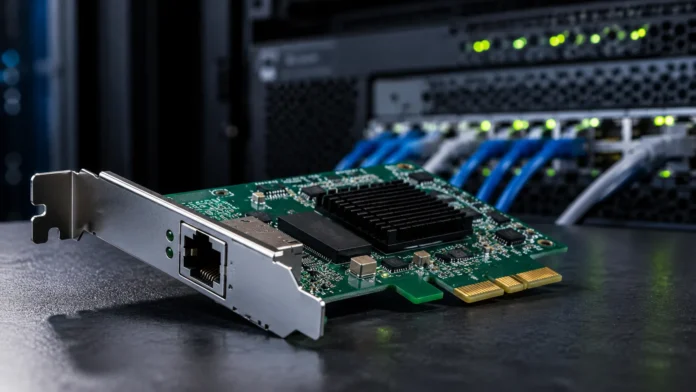

What Is a NIC? Network Interface Cards Explained
A NIC, or Network Interface Card, is the hardware component that allows a computer or another electronic device to connect to a network and communicate with other devices. A NIC can provide a wired Ethernet connection, a wireless Wi-Fi connection, or sometimes both depending on the device and hardware design. Modern computers often have network interfaces built directly into the motherboard, while desktops, servers, and specialized systems may use separate expansion cards or external adapters. Without a compatible network interface, a device cannot communicate normally with routers, switches, servers, or the internet through that network. Understanding NICs helps explain how computers actually send and receive data across local and wide-area networks.
Network interface cards are used in desktops, laptops, servers, network-attached storage systems, industrial computers, gaming PCs, point-of-sale terminals, and many other connected devices. They handle important tasks such as transmitting data, receiving network frames, identifying the device through a MAC address, and converting information into signals suitable for the network medium. NIC capabilities differ considerably, ranging from basic 1 Gigabit Ethernet adapters to high-speed enterprise interfaces supporting 10, 25, 40, 100 Gigabit Ethernet, or beyond. Wireless adapters also vary according to Wi-Fi generation, supported frequency bands, antennas, and security capabilities. This guide explains what a NIC is, how it works, the major NIC types, common examples, network speeds, troubleshooting, and how to choose the right network adapter.
What Is a NIC?
NIC stands for Network Interface Card, although the term is also commonly expanded as Network Interface Controller. Both expressions refer to the hardware interface that allows a device to participate in a computer network. Traditionally, a NIC was a physical expansion card installed inside a desktop computer, which explains why the word “card” remains common. Modern laptops and desktops often include network controllers directly on the motherboard instead. Even when no removable card exists, people may still call the built-in networking hardware a NIC. The fundamental purpose remains unchanged: the interface creates the connection between the computer and the communication medium used by the network.
A NIC operates at the boundary between the computer and the network. Software creates information that needs to be transmitted, and the networking system converts that information into appropriately structured data for transmission. The NIC then turns those digital instructions into electrical, optical, or radio signals depending on whether the connection uses copper Ethernet, fiber, or wireless technology. Incoming signals travel through the opposite process. The interface receives them, verifies relevant frame information, and passes the data toward the operating system. This combination of hardware and software coordination allows applications to communicate without needing to control network signaling directly.
Most NICs include a unique hardware identifier known as a MAC address, short for Media Access Control address. This identifier is associated with network communication at the local network level and helps devices distinguish one interface from another. Routers, switches, access points, and operating systems can use MAC addresses when forwarding traffic or maintaining local network information. A computer with both Ethernet and Wi-Fi normally has a different MAC address for each interface. Some modern operating systems can also use randomized MAC addresses in selected situations, particularly on wireless networks, to improve privacy.
The operating system interacts with the NIC through a device driver. The driver translates between the operating system’s networking functions and the specific hardware features of the adapter. If the driver is missing, corrupted, outdated, or incompatible, the network interface may stop working correctly even when the physical hardware is healthy. Modern operating systems include drivers for many common NICs automatically, while specialized adapters may require software from the manufacturer. Drivers can also expose advanced settings such as link speed, power management, offloading, VLAN support, and wake-on-LAN behavior.
NICs are not limited to personal computers. Servers may contain several network interfaces so traffic can be separated across management, storage, application, and backup networks. Industrial machines can use ruggedized network interfaces designed for demanding environments, while embedded systems may integrate compact Ethernet or wireless controllers directly into their circuit boards. Virtual machines can even use virtual network interfaces created entirely through software. The term NIC therefore covers a broad family of network interfaces rather than one specific removable card. What connects them is their role as the device’s gateway into a network.
How Does a Network Interface Card Work?
When an application sends information across a network, the data passes through several software networking layers before reaching the NIC. The operating system divides or organizes the information according to networking protocols and prepares it for transmission through the selected interface. At the Ethernet level, the data is packaged into frames containing addressing and control information. The NIC receives those frames and prepares them for the physical network medium. On a wired Ethernet connection, electrical or optical signaling represents the data, while a wireless NIC uses radio transmissions. The receiving device performs the reverse sequence to reconstruct the information.
A wired NIC usually connects with a switch, router, or another network device through an Ethernet cable. Copper Ethernet commonly uses an RJ45-style connector on typical home and office equipment, although enterprise networking can also use fiber connections and specialized transceivers. The NIC and connected network device negotiate compatible link parameters such as speed and duplex operation. If both support Gigabit Ethernet, for example, they may establish a 1 Gbps link when cable quality and configuration allow it. Problems with cables, ports, or negotiation can cause the connection to operate at a lower speed or fail entirely.
Wireless NICs use radio frequencies instead of physical Ethernet cables. The adapter communicates with a wireless access point or router using supported Wi-Fi standards and frequency bands. Authentication and encryption procedures help establish a secure connection before normal data traffic begins. Signal strength, interference, distance, channel conditions, and the capabilities of both the wireless NIC and access point influence performance. A high-speed Wi-Fi adapter cannot achieve its maximum capability when connected to an older router or operating in a heavily congested environment. Wireless network performance therefore depends on the entire communication path rather than the adapter alone.
The NIC can perform some networking tasks directly in hardware to reduce work for the computer’s processor. Modern adapters may support checksum offloading, segmentation offloading, receive-side scaling, interrupt moderation, and other acceleration features. These capabilities are particularly useful in servers handling large amounts of network traffic. Rather than asking the CPU to process every small networking operation independently, the NIC handles selected repetitive tasks more efficiently. High-end server adapters may provide even more sophisticated hardware acceleration. The exact feature set depends on the adapter, operating system, drivers, and workload.
When data reaches the NIC from the network, the interface checks the incoming frames and determines whether they should be passed to the host system. The operating system then processes higher-level protocol information and delivers the data to the correct application. This entire sequence occurs extremely quickly, often millions of times per second in busy systems. Users simply see a website loading, a file transferring, or a video stream playing. The NIC hides much of the physical communication complexity behind a standardized network interface, making connectivity feel simple despite the large amount of processing occurring underneath.
Types of Network Interface Cards
Ethernet NICs are among the most common network interface types. They provide wired connections using Ethernet standards and are widely used in desktops, servers, workstations, network storage devices, and industrial equipment. Basic consumer adapters commonly support 1 Gigabit Ethernet, while newer systems increasingly support 2.5 Gigabit or faster networking. Enterprise servers may use 10, 25, 40, 100 Gigabit Ethernet, or higher depending on workload and infrastructure. Wired connections are popular because they provide predictable latency, consistent throughput, and less radio interference than Wi-Fi. They are especially valuable for servers, gaming systems, workstations, and high-bandwidth storage.
Wireless NICs allow computers and other devices to connect through Wi-Fi instead of Ethernet cables. They are standard in laptops, smartphones, tablets, and many modern desktops. A wireless adapter normally contains radio hardware and works with one or more antennas to send and receive signals. Support for specific Wi-Fi generations determines which features and maximum theoretical speeds are available. Dual-band and tri-band adapters may work across several frequency ranges depending on local regulations and device support. Wireless networking provides convenience and mobility, although real-world performance can vary more than wired Ethernet.
PCI Express NICs are internal expansion cards commonly installed in desktop computers and servers. They connect to the motherboard through a PCIe slot and can provide one or several network ports. PCIe offers enough bandwidth for high-speed networking, making it suitable for multi-gigabit and enterprise adapters. Desktop users may install a PCIe NIC to upgrade from 1 Gigabit Ethernet to 2.5, 5, or 10 Gigabit connectivity. Servers frequently use specialized PCIe cards with several ports and advanced offload features. Installation requires opening the computer, so this approach is most practical for systems designed to support hardware expansion.
USB network adapters provide an external alternative when an internal interface is unavailable or inconvenient. A USB-to-Ethernet adapter can add a wired network port to a thin laptop, while a USB Wi-Fi adapter can provide wireless connectivity or upgrade an older wireless standard. Performance depends on both the adapter and the USB connection because older USB versions may limit available bandwidth. External adapters are especially useful for troubleshooting because they allow users to bypass a failed built-in NIC quickly. They are also portable and easy to replace without opening the computer. The tradeoff is that they occupy a USB port and may be easier to disconnect accidentally.
Fiber network adapters are used where optical networking provides advantages such as high bandwidth, long-distance transmission, or resistance to electromagnetic interference. Rather than using ordinary copper Ethernet cables, these NICs connect through optical transceivers and compatible fiber cabling. They are common in servers, data centers, telecommunications infrastructure, and specialized enterprise systems. Different transceiver formats and fiber types support different distances and speeds. Selecting a fiber NIC therefore requires compatibility with the switch, optical modules, cabling, and network design. Fiber interfaces are less common on ordinary home computers but extremely important in high-performance networks.
NIC Components, MAC Addresses and Drivers
The network controller is the central electronic component responsible for managing communication between the host computer and the network medium. It processes Ethernet frames or wireless data, works with system memory, and coordinates transmission through the physical network hardware. Some controllers are integrated into motherboards, while others sit on separate expansion cards. High-performance controllers can include specialized processing capabilities designed to reduce CPU overhead. The controller’s capabilities determine which speeds, standards, offloads, and advanced networking features the interface supports. Manufacturers frequently use the same controller family across several different network adapter products.
The physical interface depends on the type of NIC. Wired Ethernet cards usually include one or more network ports, while fiber adapters provide slots for optical modules or fixed optical interfaces. Wireless adapters contain radio components and antenna connections instead of an Ethernet jack. LEDs near wired ports may indicate link status, traffic activity, or negotiated speed. These indicators can provide quick troubleshooting clues when a connection fails. If no link light appears after connecting a known-good cable, the problem may involve the cable, switch port, NIC, configuration, or power state.
A MAC address identifies a network interface at the data-link layer. Traditional MAC addresses are represented as a series of hexadecimal values and are used within local network communication. Ethernet switches learn which MAC addresses are reachable through specific ports and use that information to forward frames efficiently. The MAC address is different from an IP address, which operates at a higher network layer and can change according to network configuration. A device normally needs both types of addressing for ordinary IP networking. Understanding this distinction is useful when troubleshooting local connectivity and routing issues.
Device drivers are the software components that allow operating systems to control NIC hardware correctly. A driver tells the system how to initialize the adapter, send and receive data, configure speed, manage power features, and use hardware acceleration. Modern systems often install suitable drivers automatically, but manufacturer-provided versions may expose additional capabilities or improve compatibility. Problems can appear after operating-system upgrades when older drivers no longer behave correctly. Reinstalling or updating the NIC driver is therefore a common troubleshooting step when hardware appears present but network connectivity is unreliable.
Firmware may also exist on advanced network adapters and provide lower-level control over hardware behavior. Enterprise NICs can have configurable firmware supporting specialized networking, virtualization, security, or acceleration capabilities. Firmware updates may fix bugs, improve compatibility, or add functionality, but they should be applied carefully according to manufacturer guidance. Updating firmware unnecessarily can introduce risk if the process is interrupted or incompatible software is selected. Consumer NIC users rarely need to think about adapter firmware directly. Enterprise administrators, however, may manage firmware and drivers as part of a coordinated server maintenance process.
Wired NIC vs Wireless NIC
Wired NICs generally provide more predictable performance because the connection travels through a dedicated cable rather than a shared radio environment. Ethernet is less affected by walls, neighboring networks, household appliances, or radio congestion. Latency is usually stable, making wired networking attractive for online gaming, servers, workstations, video editing, and large file transfers. A wired link can also maintain high throughput more consistently when the cable and network equipment support the required speed. The main disadvantage is the need to run physical cabling between the device and network infrastructure.
Wireless NICs provide convenience because users can move without remaining physically connected to a network cable. Laptops, tablets, smartphones, and portable devices depend heavily on this flexibility. Wi-Fi can also simplify networking in buildings where installing Ethernet cables would be expensive or disruptive. Modern wireless standards can deliver impressive speeds under good conditions. However, available bandwidth is shared, and actual performance depends on distance, interference, router capability, antenna quality, and surrounding network activity. The fastest theoretical Wi-Fi number should therefore not be treated as a guaranteed real-world speed.
Security is important for both interface types, but wireless networking creates additional considerations because radio signals extend beyond physical walls. Wi-Fi networks use authentication and encryption to restrict access and protect traffic from unauthorized users. Wired networks require physical or network-level access to connect, although they are not automatically secure against every threat. Enterprises frequently use authentication, network segmentation, access controls, and monitoring regardless of whether users connect through Ethernet or Wi-Fi. A NIC provides connectivity, but broader network security depends on many additional systems and policies.
Power consumption can differ between wired and wireless adapters depending on hardware and activity. Wireless radios consume energy while scanning, maintaining connections, and transmitting information, which matters for battery-powered laptops and mobile devices. Operating systems often include wireless power-management features to extend battery life. Wired Ethernet adapters also consume power, particularly high-speed interfaces, but desktop and server environments generally care less about battery use. Energy-efficient Ethernet features can reduce consumption during periods of low activity. Power requirements become more significant when data centers operate thousands of network interfaces simultaneously.
Many computers support both wired and wireless NICs so users can choose according to the situation. A laptop may use Wi-Fi while moving around an office but connect through Ethernet at a desk for faster or more stable performance. Operating systems can prioritize one interface over another according to configuration and route availability. Running both simultaneously can support specialized scenarios, although most ordinary applications simply use whichever path the system considers preferred. Having multiple interfaces provides flexibility and can also help troubleshoot whether a connectivity problem belongs to the computer, local network, or one particular adapter.
NIC Speeds and Network Standards
NIC speed describes the maximum link rate the interface can negotiate under supported network standards. Common Ethernet speeds include 100 Mbps, 1 Gbps, 2.5 Gbps, 5 Gbps, 10 Gbps, and much faster rates in enterprise environments. A 1 Gigabit Ethernet NIC is still sufficient for many home and office tasks, especially when the internet connection itself is slower than 1 Gbps. Faster interfaces become useful for local file transfers, network storage, high-speed internet service, virtualization, video production, and data-center workloads. The network can operate only as fast as the slowest relevant component in the path.
Upgrading one computer to a 10 Gigabit NIC does not automatically create a 10 Gigabit network. The switch port, cabling, storage systems, processors, and destination device must also support enough throughput. For copper Ethernet, cable category and distance can influence which speeds operate reliably. Multi-gigabit standards such as 2.5 and 5 Gigabit Ethernet can sometimes use existing cabling more easily than 10 Gigabit connections, making them attractive upgrades for offices and homes. Network planning should therefore examine the full connection rather than concentrating only on the NIC specification.
Wireless network adapters advertise speeds based on Wi-Fi generation, channel width, number of spatial streams, frequency band, and other technical factors. These figures represent theoretical connection capabilities rather than guaranteed application throughput. Protocol overhead, interference, signal quality, distance, and competing devices reduce real-world speeds. A wireless NIC must also connect with an access point supporting compatible features before advanced capabilities can be used. Installing the newest Wi-Fi adapter while keeping a very old router may therefore provide little performance improvement. Wireless upgrades work best when client and infrastructure capabilities are considered together.
Duplex operation is another concept related to NIC performance. Modern switched Ethernet commonly operates in full-duplex mode, meaning data can be transmitted and received simultaneously. Older shared Ethernet technologies and certain misconfigurations could result in half-duplex behavior, where communication occurred in one direction at a time. Duplex mismatches historically caused severe performance and collision problems. Auto-negotiation now handles speed and duplex settings successfully in most modern networks. Manually forcing values should generally be done only when specific infrastructure requirements justify it because incorrect settings can create difficult-to-diagnose connectivity issues.
Latency matters alongside bandwidth. A high-speed NIC can transfer large amounts of data, but application responsiveness also depends on how quickly packets travel through the network and are processed by endpoints. Gaming, financial systems, voice communication, and interactive applications can be particularly sensitive to latency. High-end network adapters may include hardware and driver features designed to reduce processing delays. For normal home internet use, however, the distance to online servers and quality of the internet route often influence latency more than the local NIC. Network performance should therefore be evaluated through bandwidth, latency, packet loss, and stability together.
Common NIC Uses and Real-World Examples
A home desktop computer provides a simple NIC example. The motherboard may include a built-in Ethernet controller connected to an RJ45 network port. When the user plugs an Ethernet cable between the computer and router, the NIC negotiates a connection and receives network configuration from the operating system. The computer can then access local printers, file shares, smart devices, and the internet. If the same desktop includes a Wi-Fi adapter, the user can choose wireless connectivity instead. These interfaces make the computer capable of participating in both wired and wireless networks.
Laptops commonly use built-in wireless NICs because portability is central to their design. Many thin laptops no longer include full-size Ethernet ports, so users rely mainly on Wi-Fi or connect USB Ethernet adapters when a wired connection is required. The wireless NIC may also support Bluetooth because manufacturers often combine Wi-Fi and Bluetooth functions on one module. Antennas are usually routed through the laptop chassis or display area to improve reception. Replacing a wireless module can sometimes upgrade performance, although compatibility with the motherboard, antennas, operating system, and firmware should be checked first.
Servers often use multiple high-speed NICs because their network demands are far greater than those of ordinary PCs. One interface may handle public application traffic while another supports storage communication or administrative access. Several physical ports can be combined, separated into VLANs, or assigned to different virtual machines depending on architecture. High-speed server NICs may include specialized offloads to reduce CPU use under heavy traffic. Redundant interfaces can also provide failover if one cable, switch port, or adapter stops working. Network design becomes a major part of server reliability and performance.
Network-attached storage devices use NICs to serve files to computers across the network. A home NAS may use 1 or 2.5 Gigabit Ethernet, while professional storage systems can use 10 Gigabit or faster interfaces. Storage performance depends on network speed as well as disk or solid-state-drive capability. A fast SSD array connected through a slow network interface can be limited by network bandwidth. Users transferring large video files or backups therefore often upgrade both their NAS and workstations to multi-gigabit networking. The NIC acts as a critical bridge between storage performance and client access.
Industrial and embedded systems also rely on network interfaces for automation and monitoring. Manufacturing equipment, security systems, medical devices, digital displays, building controllers, and IoT gateways may include Ethernet or wireless NICs. These interfaces allow devices to send sensor readings, receive commands, report faults, and integrate with central management systems. Industrial NICs may require broader temperature tolerance, electrical isolation, rugged connectors, or specialized protocols. Their purpose remains the same as a consumer NIC—moving information between the device and a network—but environmental and reliability requirements can be much more demanding.
How to Choose the Right NIC
Start by identifying the network speed you genuinely need. A 1 Gigabit NIC may be entirely sufficient for ordinary browsing, office applications, streaming, and internet connections below 1 Gbps. Users working with large local files, fast network storage, or multi-gigabit broadband may benefit from 2.5, 5, or 10 Gigabit Ethernet. Servers and professional workstations can require even higher speeds. Buying an extremely fast adapter provides little benefit when the rest of the network cannot support it. Matching the NIC to the switch, router, cabling, and workload creates a more balanced and economical upgrade.
Connection type should also be considered. Desktop systems can use PCIe network cards for high performance and permanent installation, while laptops may depend on USB adapters or built-in interfaces. Servers require compatibility with available expansion slots and chassis constraints. Fiber adapters need suitable optical transceivers and switch ports, while copper NICs need compatible Ethernet cabling. Wireless upgrades require attention to antenna connections and supported Wi-Fi bands. Physical compatibility is just as important as headline speed because the fastest adapter is useless if it cannot connect properly to the system or network.
Operating-system and driver support should be checked before purchasing specialized hardware. Common consumer adapters usually work automatically with modern Windows, macOS, or Linux systems, but advanced NICs may have more limited support. Enterprise features such as SR-IOV, hardware offloading, VLAN configuration, and virtualization can depend heavily on specific drivers. Users running older operating systems should be especially careful because newer adapters may not provide compatible software. Checking the manufacturer’s support information before purchase avoids the frustration of discovering that suitable drivers do not exist after installation.
For wireless adapters, evaluate the Wi-Fi standards supported by the router and the environments where the computer will be used. A newer wireless NIC can improve speed and reliability, but antenna quality and signal conditions remain critical. Desktop PCIe Wi-Fi cards with external antennas can often provide stronger reception than tiny USB adapters. Laptops require more careful hardware compatibility checks when replacing internal modules. Bluetooth support may also matter when one wireless card handles both technologies. The best wireless NIC balances modern standards with reliable antennas, driver support, and compatibility with existing infrastructure.
Enterprise buyers should consider management features, reliability, firmware support, warranty, virtualization capabilities, and long-term availability in addition to speed. A cheap consumer NIC may be suitable for one desktop but inappropriate for a server expected to run continuously for years. Multiple ports, redundant connectivity, hardware acceleration, and vendor support can justify higher costs in critical environments. Power consumption also matters at scale. Choosing a NIC is ultimately a system-design decision involving workload, network infrastructure, software support, reliability, and budget rather than simply selecting the largest bandwidth number available.
NIC Troubleshooting and Common Problems
When a wired NIC stops working, begin with the physical connection. Check that the Ethernet cable is fully inserted and inspect the link lights on both the network adapter and switch or router. Try another known-working cable and another network port if available. A damaged cable can produce intermittent connectivity or force the link to negotiate at a lower speed. If another computer works correctly on the same cable and port, the issue may be local to the original device. Simple physical checks can eliminate many problems before software troubleshooting begins.
Next, confirm that the operating system recognizes the network adapter. Device management tools should show whether the NIC is enabled and whether the driver loaded correctly. A warning symbol can indicate a driver or hardware problem. Restarting the computer may resolve temporary issues, while updating or reinstalling the driver can correct corrupted software. Users should avoid downloading unknown drivers from unofficial sources because network drivers operate with significant system privileges. Manufacturer or operating-system update channels are safer choices when new software is required.
Wireless NIC problems often involve signal quality or interference rather than hardware failure. Move closer to the access point and check whether other devices experience similar connectivity problems. Restarting the router or temporarily disconnecting and reconnecting Wi-Fi can resolve certain temporary conditions. Forgetting and rejoining the wireless network may help when stored configuration becomes incorrect. If the adapter works on another Wi-Fi network, the problem is more likely related to the original router or configuration. Testing across environments is a useful way to separate device problems from network problems.
Slow speeds can come from link negotiation, network congestion, cable quality, Wi-Fi interference, driver settings, or limitations elsewhere in the network. Check the negotiated link speed rather than assuming the adapter is operating at its advertised maximum. A Gigabit NIC showing a 100 Mbps link may indicate an unsuitable or damaged cable. On Wi-Fi, the displayed connection rate can vary as signal conditions change. Internet speed tests also cannot reveal the maximum local NIC performance when the broadband connection is slower. Local file transfers can provide a better test of LAN performance in appropriate environments.
If troubleshooting suggests the built-in NIC has failed, an external adapter can provide a convenient workaround. USB Ethernet and Wi-Fi adapters can restore connectivity without replacing the entire motherboard. Desktop users can install a PCIe NIC for a more permanent replacement or upgrade. Before assuming hardware failure, however, resetting network configuration or testing with another operating environment can help rule out software problems. NICs are generally reliable components, but drivers, cables, router ports, and configuration issues are often mistaken for failed hardware. A structured troubleshooting process identifies the faulty layer more efficiently.
Conclusion
A NIC, or Network Interface Card, is the hardware interface that allows a computer or electronic device to connect and communicate through a network. It can provide wired Ethernet, wireless Wi-Fi, fiber connectivity, or another supported networking method. Although older computers commonly used separate expansion cards, modern devices often integrate network controllers directly onto the motherboard. The term NIC still applies because the functional role remains the same. It creates the bridge between the device’s internal computing environment and the external network carrying its data.
NICs work by receiving data from the operating system, preparing it for transmission, and converting it into signals appropriate for the network medium. Incoming signals are processed in the opposite direction and delivered back to software. Drivers allow the operating system to control the hardware, while MAC addresses help identify network interfaces on local networks. Advanced adapters can also perform hardware acceleration that reduces processor workload. These capabilities make the NIC much more than a simple cable connector.
Different NIC types serve different environments. Ethernet adapters provide reliable wired connectivity, wireless cards add mobility through Wi-Fi, PCIe cards offer internal expansion, and USB adapters provide convenient external connectivity. Fiber NICs support high-speed or long-distance optical networks, particularly in enterprise and data-center environments. Network speeds range from basic Fast Ethernet through multi-gigabit consumer networking and extremely high-bandwidth server connections. Choosing the appropriate interface depends on infrastructure, workload, device compatibility, and cost.
The NIC alone does not determine total network performance. Routers, switches, cabling, wireless signal quality, server performance, storage speed, internet service, and protocol overhead can all become bottlenecks. A 10 Gigabit network adapter cannot deliver 10 Gbps through a switch that supports only 1 Gbps. Likewise, a modern Wi-Fi card cannot overcome severe interference or an outdated access point. Network performance should therefore be viewed as an end-to-end system. Upgrades provide the greatest value when all important parts of the connection are reasonably balanced.
Ultimately, the Network Interface Card is one of the foundational components that makes modern digital communication possible. Every website request, shared file, cloud application, network game, video stream, or remote login depends on some form of network interface along the path. Understanding NICs makes it easier to interpret Ethernet speeds, Wi-Fi capabilities, MAC addresses, drivers, network ports, and connectivity problems. Whether built into a laptop or installed as a high-performance server card, the NIC serves the same essential purpose: giving a device a reliable way to communicate with the network around it.
Frequently Asked Questions About NICs
What does NIC stand for?
NIC stands for Network Interface Card or, in some contexts, Network Interface Controller. It is the hardware interface that allows a computer or another device to connect and exchange data through a network.
Is Wi-Fi a NIC?
A Wi-Fi adapter is a type of wireless NIC because it provides the network interface used to communicate over a wireless network. Computers may have separate Ethernet and Wi-Fi NICs, each with its own hardware and network configuration.
Does every computer have a NIC?
Most modern computers have at least one network interface built in, such as Wi-Fi or Ethernet. Additional NICs can be installed through PCIe, USB, or other interfaces when more ports, faster speeds, or different network technologies are required.
What is the difference between a NIC and a MAC address?
A NIC is the hardware or virtual network interface itself, while a MAC address is an identifier associated with that interface for local network communication. A device with several NICs will normally have different MAC addresses for each interface.
Can a faster NIC improve internet speed?
Only if the existing network interface is the bottleneck and the router, cabling, and internet connection can support higher speeds. Upgrading from 1 Gigabit to 10 Gigabit Ethernet will not make a 300 Mbps internet service suddenly run at 10 Gbps.




