
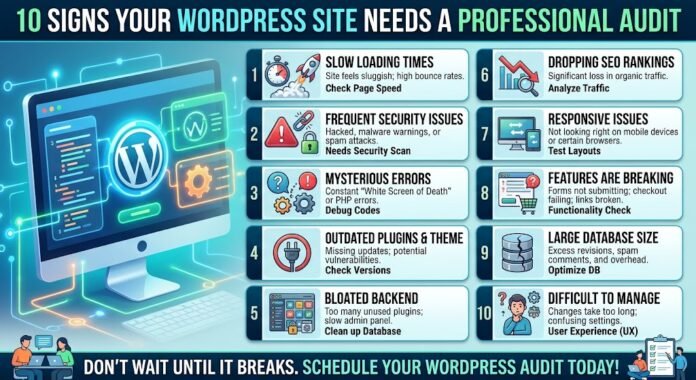

Websites rarely break overnight. They slow down a little after one plugin update, lose a few rankings after a theme change, collect a few warnings nobody reads. Then one day the site feels heavy, leads dry up and nobody can say exactly why.
That slow drift is the reason audits exist. A good audit turns vague worries into a clear to-do list. Here are ten signs it’s time to stop guessing and get a proper look under the hood.
The warning signs
- Pages take more than three seconds to load on mobile, even on a good connection.
- Organic traffic has dropped for months, and there’s no obvious Google update to blame.
- You have over 40 plugins installed, and nobody remembers what half of them do.
- The theme or plugins haven’t been updated in a year because “something might break.”
- Visitors arrive, but contact forms and checkouts barely convert.
- Search Console is full of crawl errors, duplicate pages or indexing warnings.
- Your hosting bill keeps growing while performance stays the same.
- You’ve been hacked before, or you get suspicious login attempts every day.
- Simple content edits require a developer because the builder setup is a mess.
- You’re planning a redesign or migration and want to know what to keep.
Recognise three or more? Then an audit will probably save you money. Recognise five? Don’t wait for the next traffic drop.
What a real audit covers
A quick speed test is not an audit. A professional review digs into the whole stack and gives you a prioritised list of fixes rather than a pile of scores. Typically it covers:
- Core Web Vitals and server performance
- Plugin and theme security, versions and conflicts
- Technical SEO, from indexing to structured data
- Code quality and custom functionality
- Accessibility and mobile usability
- Conversion paths, forms and tracking
You walk away knowing what to fix first. Some issues take ten minutes, others need a sprint, and a few can wait.
Audit first, redesign later
Plenty of companies jump straight to a full redesign when the site feels slow. Sometimes that’s right. Often, though, a handful of fixes to hosting, images and plugins brings the site back to life for a fraction of the cost. An audit tells you which situation you’re in, so you don’t spend a big budget fixing the wrong problem.
Beetweb offers WordPress audit services that check performance, security, SEO and code in one go, with a clear action plan at the end. No 80-page PDF full of jargon, just priorities you can act on. If you’d rather not handle the fixes in-house, their WordPress maintenance and support plans keep the site healthy long after the audit is done.