

What Is a Flipper?
A flipper is generally an object, device, or mechanism designed to flip, turn, or move something. However, the meaning changes depending on the industry and context. In technology, the term often refers to the Flipper Zero, a portable electronic multitool used for learning about wireless communication and digital systems. Understanding these different meanings helps explain why the term appears in various technical discussions.
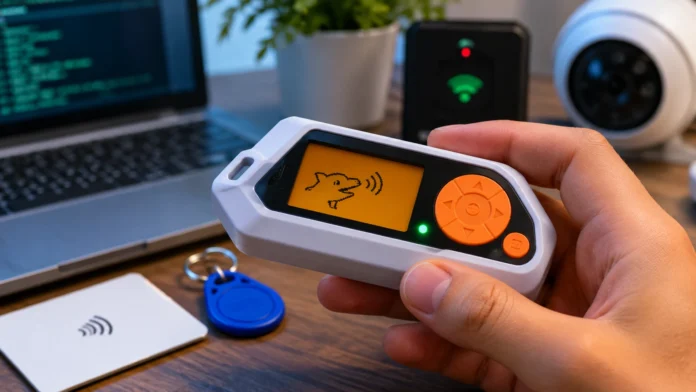
The Flipper Zero is a compact device that combines several electronic communication technologies into one portable unit. It can interact with certain radio signals, infrared devices, NFC tags, and RFID systems. The device has gained attention among technology enthusiasts because it makes complex communication concepts easier to explore. Its accessible interface allows users to understand electronic systems without requiring extensive technical experience.
Beyond electronic devices, the word flipper appears in mechanical engineering, robotics, and other industries. It may describe a movable component responsible for changing an object’s position or direction. Although these applications are different, they share the basic concept of controlled movement or interaction. Recognizing the context is essential when determining what someone means by a flipper.
What Does Flipper Mean in Technology?
In technology, a flipper can describe a mechanical component, an electronic tool, or a device that changes between different operating states. For example, robotic systems sometimes use flipping mechanisms to move objects or adjust their position. Digital electronics may also use switching components that perform related functions. The intended meaning depends on the specific technology being discussed.
More recently, the term has become strongly associated with the Flipper Zero device. This portable gadget brings several wireless communication and hardware testing functions together. It allows users to study how compatible electronic devices exchange information through different communication methods. As a result, the word flipper frequently appears in conversations about cybersecurity, electronics, and wireless technology.
However, not every flipper is a cybersecurity device or a programmable electronic tool. Some are simple mechanical parts used in manufacturing equipment, entertainment machines, or automated systems. Others are components that help control physical movement. Understanding this distinction prevents confusion when reading product descriptions, technical articles, or discussions about modern electronic equipment.
What Is Flipper Zero and Why Is It Popular?
Flipper Zero is a portable electronic multitool designed for exploring hardware, communication protocols, and certain digital security concepts. It combines multiple technologies inside a compact handheld device with a small screen and physical controls. Its distinctive appearance includes a playful dolphin-themed interface. This design makes technical experimentation feel more approachable for people interested in learning about electronics.
One reason for its popularity is its ability to bring different functions into a single device. Instead of requiring separate tools for every supported communication technology, users can explore multiple systems from one platform. Its features include infrared communication, NFC, low-frequency RFID, and supported radio-frequency interactions. However, its capabilities depend on technical compatibility and system protections.
The device has also attracted attention through technology demonstrations, educational discussions, and online communities. Developers appreciate its customizable software and opportunities for hardware experimentation. Beginners may find the visual interface useful for understanding concepts that otherwise seem complicated. Despite its popularity, Flipper Zero is not a universal tool capable of controlling or accessing every electronic device.
How Does a Flipper Zero Work?
Flipper Zero works by using specialized electronic components to communicate with compatible devices and signals. Different built-in modules support different communication standards, including radio frequencies, infrared light, and proximity-based technologies. Its processor manages these functions through software applications. Each communication method operates according to specific technical requirements rather than one universal system.
The device includes a small display and physical buttons that allow users to navigate its interface. Its software organizes supported functions into separate applications designed for particular technologies. Some functions help users study signals, while others support hardware development and authorized testing. Understanding the purpose of each module is important because different technologies have different limitations.
A Flipper Zero also relies on firmware to manage its hardware and available features. Firmware is the software that controls how an electronic device operates at a basic level. Developers may create compatible applications that extend certain educational and development capabilities. However, software changes cannot automatically overcome hardware restrictions, encryption, or the security protections built into other systems.
Main Features of the Flipper Zero Device
One important feature of Flipper Zero is its combination of several communication technologies in a portable design. The device includes modules for NFC, low-frequency RFID, infrared communication, and selected sub-gigahertz radio frequencies. Bluetooth connectivity provides additional communication possibilities with compatible devices. These features make it useful for studying how different electronic systems exchange information.
The device also includes a monochrome display, navigation buttons, a rechargeable battery, and a USB connection. A microSD card can provide storage for supported applications and data. Its compact construction makes it convenient for educational demonstrations and electronics projects. However, available storage, battery life, and individual application performance depend on the conditions of use.
General-purpose input/output connections, commonly called GPIO pins, provide additional possibilities for hardware development. These connections allow compatible electronic components to communicate with the device during controlled experiments. Developers can use them to investigate basic digital interfaces and microcontroller concepts. Such activities require an understanding of electrical safety and the technical specifications of connected components.
What Is NFC and How Does a Flipper Use It?
Near Field Communication, or NFC, is a short-range wireless technology that allows compatible devices to exchange information. It is commonly found in contactless cards, smart tags, and electronic identification systems. NFC usually operates over very short distances. This limited operating range makes it useful for applications where devices need to be close together.
Flipper Zero includes an NFC module that supports selected communication standards and compatible tags. In educational settings, it can help demonstrate how NFC technologies identify and exchange information. Developers can also study supported tag formats within authorized testing environments. However, encryption, authentication requirements, and hardware compatibility can prevent access to protected information.
Understanding NFC is useful because it appears in many everyday technologies. Contactless transportation cards, digital business cards, and various identification systems may use related standards. However, these applications do not all provide the same access or functionality. Studying NFC through legitimate demonstrations helps users understand the relationship between wireless convenience, authentication, and information security.
Understanding RFID Technology in Flipper Devices
Radio Frequency Identification, commonly called RFID, uses radio waves to identify or communicate with compatible electronic tags. RFID systems generally include a reader and a tag containing identification information. Different RFID technologies operate at different frequencies and follow different communication standards. They are commonly used in inventory management, identification, and various automated systems.
Flipper Zero includes support for certain low-frequency RFID technologies, including systems operating at 125 kilohertz. This capability is separate from its higher-frequency NFC functionality. The distinction matters because RFID and NFC technologies do not necessarily use identical protocols. A device that supports one type of communication cannot automatically interact with every other RFID system.
Learning about RFID can help students and technology enthusiasts understand electronic identification. For example, a supervised educational demonstration might compare how approved sample tags store different identification values. Such experiments can introduce concepts including radio communication, data representation, and access control. Responsible learning should use authorized equipment rather than real identification credentials belonging to other people.
Infrared Communication and Its Tech Applications
Infrared communication uses light outside the visible spectrum to transmit information between compatible devices. Many traditional television, audio system, and air-conditioning remotes use infrared signals. These systems typically require a suitable communication path between the transmitter and receiver. Their simplicity makes infrared technology a useful subject for introductory electronics education.
Flipper Zero includes infrared hardware designed to interact with supported infrared communication protocols. This capability can demonstrate how remote-control devices encode and transmit commands. In a controlled learning environment, users can study the relationship between transmitted signals and electronic responses. Compatibility varies because manufacturers and device models may use different communication methods.
Infrared technology also illustrates an important difference between wireless systems. Unlike many radio-based technologies, conventional infrared remotes generally require a suitable line of sight. Physical barriers and environmental conditions can affect performance. Comparing infrared with other communication methods helps learners understand why electronic devices use different technologies for different practical requirements.
Radio Frequency Features of Flipper Zero
Radio frequency communication allows electronic devices to exchange information using electromagnetic waves. Many sensors, remote controls, and connected devices rely on radio technology for everyday operations. The frequencies and communication protocols vary depending on the application. Understanding these differences is important when studying wireless electronics and how devices communicate without physical connections.
Flipper Zero contains a sub-gigahertz radio module that supports selected frequency bands, depending on regional specifications. This technology can be useful for learning about basic wireless communication principles in approved environments. However, frequency compatibility does not guarantee compatibility with every device or protocol. Modern systems may also use authentication and other protections that limit interactions.
Radio communication is subject to technical rules and regulatory requirements in different countries. Some frequency bands have restrictions concerning transmission power, permitted applications, or equipment operation. Therefore, educational activities should remain within applicable regulations and authorized testing environments. Learning these principles helps develop a more responsible understanding of wireless technology and its limitations.
Bluetooth, USB, and Other Connectivity Options
Bluetooth is another communication technology supported by the Flipper Zero platform. It allows compatible devices to exchange information wirelessly over relatively short distances. Bluetooth Low Energy is designed for applications where efficient power consumption is important. In supported configurations, Bluetooth can help connect the Flipper Zero with companion software and compatible devices.
USB connectivity provides a physical connection between the device and a computer. This connection supports legitimate device management tasks and certain development functions. It can also help demonstrate how computers communicate with connected electronic equipment. The exact functionality depends on the software environment and operating system compatibility.
Combining wired and wireless connectivity gives developers different ways to explore electronic communication. Bluetooth emphasizes wireless device interaction, while USB provides a direct physical interface. These technologies have distinct advantages and limitations. Understanding both can help beginners develop practical knowledge about connectivity, device management, and communication standards used in everyday computing.
How Flipper Devices Are Used in Cybersecurity
Cybersecurity involves protecting digital devices, networks, and information from unauthorized access or disruption. Flipper Zero can support certain educational activities involving wireless communication and hardware security. For example, students may study how different authentication technologies are designed to protect electronic systems. Such learning can reveal why appropriate security controls are important.
Professional security assessments sometimes involve examining the behavior of approved hardware and communication systems. However, these activities require explicit authorization from the system owner and a clearly defined testing scope. Flipper Zero does not replace the specialized equipment or expertise needed for comprehensive security evaluations. It is better understood as one limited tool within a much broader technical field.
For beginners, the most valuable cybersecurity lessons involve understanding risks rather than attempting to defeat security protections. Learning about encryption, device authentication, and access permissions provides a strong foundation. Controlled demonstrations can show why older and newer technologies offer different levels of protection. This educational approach encourages responsible technical curiosity without compromising someone else’s security or privacy.
Educational Benefits of Using Flipper Technology
Flipper technology can provide a practical introduction to several areas of computer science and electronics. Students may encounter concepts such as communication protocols, microcontrollers, digital signals, and wireless data exchange. Seeing these ideas demonstrated through physical hardware can make abstract technical subjects easier to understand. Practical learning is especially useful when combined with clear explanations and guided activities.
Another educational benefit is the opportunity to explore how hardware and software work together. Electronic components perform physical communication tasks, while firmware controls their behavior. This relationship appears throughout modern computing, from household electronics to industrial equipment. Understanding the connection between physical devices and software can support future learning in engineering and computer science.
Flipper Zero can also encourage problem-solving and analytical thinking in structured learning environments. Instead of viewing digital devices as mysterious systems, learners can investigate how their components operate. Classroom demonstrations using approved sample equipment may introduce useful technical vocabulary and concepts. These experiences can support curiosity while reinforcing the importance of safety, privacy, and responsible technology use.
Benefits and Limitations of Flipper Zero
One important benefit of Flipper Zero is the convenience of combining multiple electronic interfaces into a single portable device. This makes it possible to introduce several communication technologies without relying on completely separate platforms for every demonstration. Its user-friendly interface can also support learning. However, these advantages are most useful when the device matches the intended educational purpose.
Another benefit is its customizable software environment and compatibility with selected development projects. Open-source resources can help experienced developers understand how the platform operates. Nevertheless, users should recognize that advanced projects may require technical knowledge beyond the device’s basic interface. Hardware compatibility, software stability, and available documentation can influence the learning experience.
Flipper Zero also has significant limitations that are sometimes overlooked in online discussions. It cannot automatically bypass encrypted systems, overcome modern authentication, or communicate with every wireless device. Its radio hardware supports specific frequency ranges and protocols rather than all available technologies. Understanding these restrictions helps separate realistic technical capabilities from exaggerated claims about what the device can accomplish.
Is Flipper Zero Legal and Safe to Use?
The legality of Flipper Zero depends on local laws, regulatory requirements, and how the device is used. Owning an electronic testing tool may be permitted in many locations, but that does not authorize interference with other people’s systems. Wireless transmission regulations can also differ between countries. Anyone studying the technology should understand the relevant rules before participating in practical activities.
Privacy is another important consideration when learning about electronic communication. Identification systems, contactless cards, and connected devices may handle information that belongs to individuals or organizations. Accessing, copying, or interfering with protected information without permission can violate privacy and security requirements. Responsible use should remain limited to approved educational materials and explicitly authorized systems.
Physical safety matters when exploring electronic hardware and development connections. Improper wiring or unsuitable electrical components can damage equipment or create safety hazards. Beginners should use supervised learning environments and follow appropriate hardware safety guidance. Combining technical knowledge with ethical awareness helps ensure that educational activities remain constructive, respectful, and safe.
Other Meanings of Flipper in Different Industries
Although Flipper Zero is well known among technology enthusiasts, the word flipper has several other meanings. In pinball machines, flippers are mechanical controls that strike a ball and influence its direction. These components are essential to the game’s operation. Their movement provides a familiar example of how the term relates to turning or redirecting an object.
In robotics and mechanical engineering, flippers can describe moving parts that help reposition objects or support a machine’s movement. Some robotic designs use articulated components to adapt to uneven surfaces or changing conditions. Industrial equipment may also include mechanisms that rotate materials during production. These applications demonstrate how mechanical design principles extend across different technologies.
The word also appears outside engineering and electronics. In real estate, a flipper may be someone who purchases property with the intention of reselling it. In other situations, the term simply describes something that flips or turns. Therefore, understanding the surrounding context is necessary before assuming that every reference to a flipper concerns the same device.
Conclusion
Understanding what is a flipper begins with recognizing that the word has different meanings across technology and everyday language. In modern electronics discussions, it often refers to the Flipper Zero, a portable multitool designed for exploring supported communication technologies. Its features include NFC, RFID, infrared, and selected radio interfaces. These capabilities make it an interesting subject for technical education.
Flipper Zero can help learners understand communication protocols, hardware development, and basic cybersecurity principles. However, its usefulness depends on technical compatibility, appropriate learning objectives, and responsible use. It is not a universal device capable of controlling or accessing every electronic system. Recognizing these limitations is essential for developing accurate expectations about its capabilities.
Ultimately, flipper technology highlights how hardware and software can work together to explore digital communication. Whether the term describes a mechanical component or a modern electronic device, its meaning depends on context. For people interested in electronics, the most valuable approach involves understanding underlying principles, respecting security boundaries, and using technology safely within authorized environments.
Frequently Asked Questions
What Is a Flipper Used For?
A flipper can describe a mechanical component or an electronic device. In technology, Flipper Zero is used for learning about wireless communication, supported electronic protocols, hardware development, and authorized security testing.
What Is a Flipper Zero Device?
Flipper Zero is a portable electronic multitool that supports technologies such as NFC, RFID, infrared, Bluetooth, and selected radio frequencies. It is designed for hardware exploration, technical education, and legitimate development activities.
Can a Flipper Zero Hack Any Device?
No, Flipper Zero cannot access or control every electronic device. Its capabilities are limited by hardware compatibility, supported protocols, encryption, authentication requirements, and the security protections used by other systems.
Is Flipper Zero Legal to Own?
Flipper Zero ownership may be legal in many places, but regulations vary by country. Using electronic tools to interfere with systems without authorization or violating wireless transmission rules may be unlawful.
Is Flipper Zero Suitable for Beginners?
Flipper Zero has a relatively accessible interface, making certain educational features understandable to beginners. However, advanced applications require knowledge of electronics, communication protocols, and cybersecurity principles, along with appropriate safety precautions.